Acer 13-in-1 Laptop Docking Station, USB-C 3 Display Docking
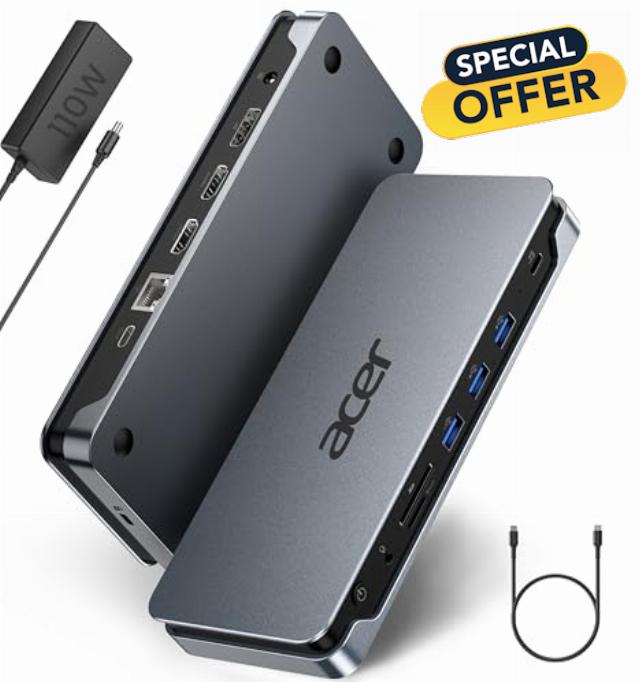
Acer 13-in-1 Laptop Docking Station, USB-C 3 Display Docking (2 HDMI+1 DP) 100W Laptop Charging, 5Gbps USB-A/C, 1Gbps LAN, Requires Full-Featured USB-C Port, Windows Compatible,macOS Supports Only SST
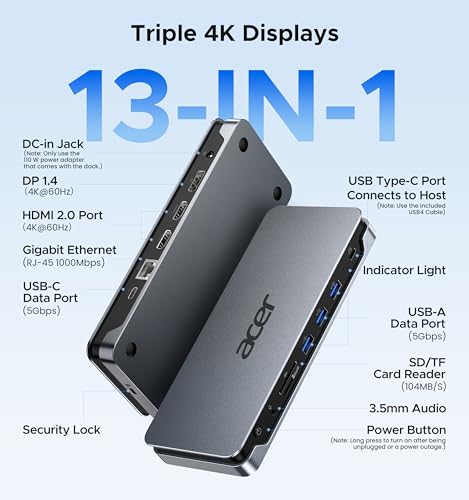
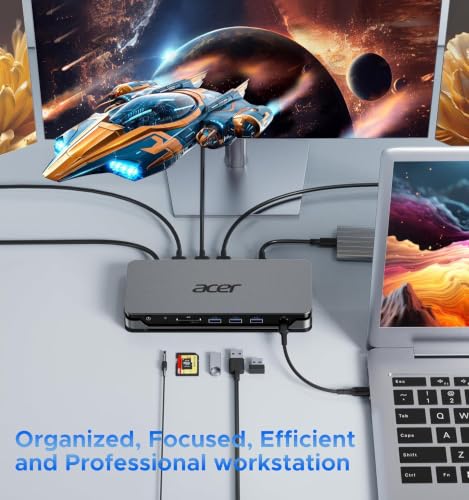
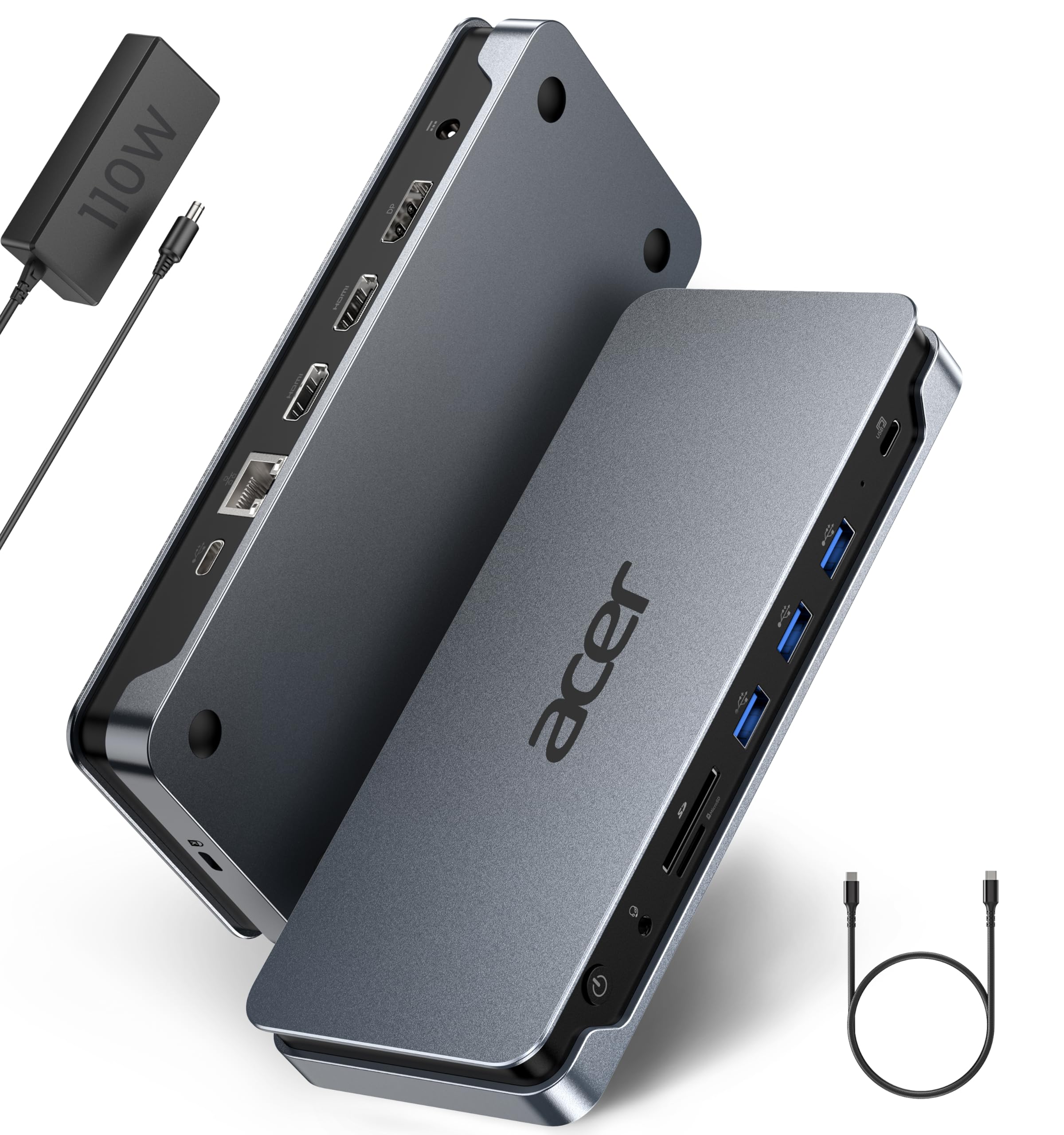
- Premium 13 in 1 Docking Station: This laptop docking station comes with original 110W power adapter, 2x HDMI, 1x DisplayPort , 1 USB-C and 3 USB-A supporting high-speed data transfer, 1 USB-C for additional connectivity, Gigabit Ethernet,3.5mm AUX jack, SD/TF reader(read and write SD/MicroSD card simultaneously). Acer all-in-one USB C docking station meets all your expansion needs, enhancing work efficiency significantly. : – . , .
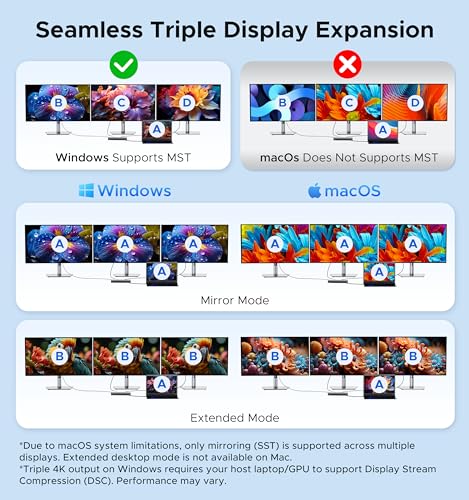
- Seamless Triple Display Expansion: Build a powerful command center. This Acer docking station supports three independent screens (2x HDMI + 1x DP 1.4) for Windows laptops via MST technology. For compatible Windows laptops with Display Stream Compression (DSC), it can support triple 4K @ 30Hz output. Multitask like a pro—extend your financial charts, code, and research across all monitors to boost productivity. Note1: Due to macOS system limitations, only mirroring (SST) is supported across multiple displays. Extended desktop mode is not available on Mac. Note2: Triple 4K output on Windows requires your host laptop/GPU to support Display Stream Compression (DSC). Performance may vary.
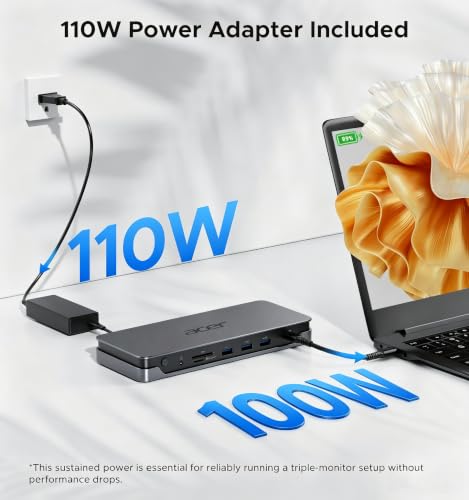
- 110W Power Adapter Included:The included 110W power adapter delivers robust 100W of power directly to your laptop through the USB-C PD host port, ensuring it stays charged even under the heaviest workloads. This sustained power is essential for reliably running a triple-monitor setup without performance drops. For the optimal experience, we recommend using the included 110W adapter and Type-C cable to unlock the full potential of your docking station. : 85 . – .
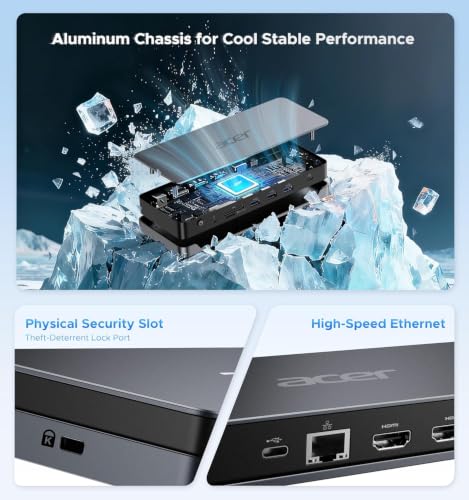
- Total Connectivity for a Clutter-Free & Cool-Running:Transform your workflow. This hub consolidates everything—networking, storage, audio, multiple displays, and power—into a single, sleek aluminum body that dissipates heat efficiently to maintain peak performance during prolonged use. Eliminate cable chaos and build a focused, efficient, and professional workstation.
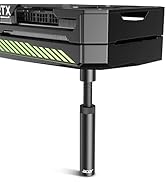
- Stable Performance & Theft Deterrence: We designed every aspect of this dock for a seamless and secure experience. It delivers stable power and data transfer to protect your devices. Furthermore, the integrated security slot enables you to lock the docking station and your laptop to your desk with a standard cable lock (not including), providing a crucial layer of physical security for your workspace in offices, dorms, or public areas. : ’ – , ; .
- Your All-in-One Solution for Enhanced Productivity: Inside the box, you'll find 1x Acer docking station,1x 110W power adapter,1x USB 4.0 type-c cable, 1x User mannul, 1x Quick Guide. Experience the perfect blend of advanced features and affordability, designed to elevate your workflow. For a truly seamless experience, our support team is ready to assist and will answer any inquiry within 18 hours.
From the brand
Q1: Can this device work with macOS?
A:Yes.Compatible with macOS but not recommended. MST only works on Windows, macOS supports SST only due to system limits.
Q2: What is MST and what are its usage requirements?
A: MST stands for Multi-Stream Transport, enabling multi-screen simultaneous display.
Requirement: Your laptop must equip with full-featured USB-C port supporting DP Alt Mode, and run Windows system.
:
Please contact the listed on the right side of the product page for any issues. Your inquiries will be handled efficiently and promptly.
-
Acer Gadget
-
Acer Gadget
-
Acer Gadget
Acer Gadget is a subsidiary company of Acer Inc.,
A top global information and communication technology enterprise. Acer Gadget aims to provide different products, services, and solutions across a variety of industries to enable digital transformation and improve customer lifestyles.
Featured Brands: Acer, Nitro, emachines, e10, Pawbo, Xplova
| SKU: | B0H8769Y5Q |
| Dimensions: | 7.89″L x 3.25″W x 0.94″H |
| Brand: | Acer |
| Colour: | Space Gray |
| Manufacture: | acer |
| Colour: | Space Gray |
From the brand

Makes My Setup So Much Easie
This docking station has been super convenient! I love being able to connect everything to my laptop through one device instead of having cables everywhere. The ports work well, connections are quick, and it makes using multiple monitors and accessories much easier. It feels sturdy and doesn’t take up much space on my desk. Great for keeping a work setup organized and definitely worth it!
Reasonably decent 5in1 USB-C hub/dock, HDMI 2.0/4K@60Hz, 3x USB-A/5Gbps, PD/92W (85W max), cord/18cm
This is a reasonably decent (albeit somewhat basic) multifunctional USB-C dock/hub that seems well-constructed and for the most part works as expected without issues. It has a single HDMI port capable of up to 4K@60Hz as well as charging port (85W max) via USB-C and 3x USB-A ports rated for 5 Gbps; nothing fancy but it’s perfect for what I need it for. It’s advertised as being capable of 100W although in reality it’s only capable of up to 92W (pic 6) to the laptop because some of that is required to power other devices as well as itself (even when no other devices is plugged in).
However, keep in mind that it specifically states that 85W to be maximum output, so it’s probably the best to stay within that limit to minimize potential issues. In any case, it’s still more than adequate for most people and it’s certainly better than many other docks/hubs that can only provide up to around 80W or thereabouts.
Btw, I should also mention that this particular model does NOT appear to work with USB wall chargers rated for 140W (tried 2 different brands with the same result); therefore, it may or may not work for you if you only have a 140W USB wall charger (and possibly power banks too). I have no issues with USB wall chargers rated for 100W though (tested with 3 different brands without issues).
Unfortunately, like many other docks/hubs out there on the market today, this one ONLY supports up to 4K@60Hz which is considered somewhat LOW especially when it ONLY supports a single display. With that being said, the vast majority of other docks capable of a single monitor (HDMI/DP) that I’ve come across and reviewed (several dozens) also only support at most 4K@60Hz although they should really do better (i.e. 4K@120Hz perhaps) at this point in time in my mind. If you need dual 4K/60Hz or 4K/120Hz, you might wanna check out some of the models from Plugable/Wavlink. In any event, it does work just fine with 4K@60Hz although like I said it’s not something to write home about.
Similar to many other 5- to 8-in-1 docks out there though, it does have 3x USB (3x USB-A) ports rated for 5 Gbps; however, it would’ve been MUCH better if it had at least one USB-C port and/or the USB-C port were rated for 10 Gbps instead in order to make use of NVMe enclosures that’s quite common nowadays. Unlike many others though, it does NOT have a GigE/RJ45 or a 3.5mm port so that’s something to keep in mind because the GigE (or even 2.5 GigE) port is one of the most sought out features of these USB-C docks for obvious reasons.
Specs & features
* 1x 100W PD (Input, 20V/5A)
* 1x 92W PD (Output, built-in cable, 18 cm); max 85W from manufacturer
* 1x HDMI 4K@60Hz
* 3x USB-A 3.0 @ 5 Gbps
What I like
Nice and clean physical build and appears to be well constructed
Slim (slightly more so than some others), compact, and portable
3x USB 3.0 ports @ 5Gbps (3x USB-A)
Fast data transfer via USB 3.0 port when connecting to an external USB 3.0 dock
Plug’n’Play – I was able to use it right away without issues
What I don’t like
Incapable of supporting resolutions/refresh rate higher than 4K@60Hz (i.e. 4K@120Hz would’ve been great)
No USB 3.2 Gen 2×1/2 ports (i.e. 10/20 Gbps)
No USB-C port(s) (@5 or 10 Gbps)
Runs a bit warmer than I’d like it to be when under high load/charging (but most of them do as well)
Value
All things considered, this is a reasonably decent (albeit somewhat basic) USB-C dock/hub that seems well-built and for the most part works as expected without issues. It’s capable of 4K@60Hz (HDMI) that some people might find inadequate especially for a single-display dock although that’s quite typical of the vast majority of other 5- to 9-in-1 docks as well. It also supports PD/92W charging via USB-C (max 85W to be safe) as well as 3x USB-A rated for 5 Gbps; however, it would’ve been much better if it has at least a single USB-C port and/or a USB port rated for 10 Gbps as well.
It’s reasonably priced at $20 for what it provides and its overall build quality, features, usability, versatility, and performance. It goes without saying that Acer is a well-known brand and I certainly hope that the name will translate to reliability and stability in the long term.
# Item reviewed: Acer/HJ_Electronic 5 in 1 USB C Hub, USBC to HDMI Adapter with 4K@60Hz for Laptop/Mac | 100W PD,HDMI2.0, 3 USB-A Data Ports, Laptop Docking Station, Type-C Dongle for MacBook Neo/Pro/Air, iPad, iPhone-Light Black
I’m really happy with this docking station and it has been a great addition to my workspace. Setting it up was simple, and it works perfectly with my dual-monitor setup. The build quality feels solid and premium, which gives me confidence that it will last. I also love having the extra USB ports and SD card reader, as they’ve been more useful than I expected. Everything is clearly labeled, making it easy to connect my devices. It’s a bit more expensive than some alternatives, but the reliability and overall quality make it well worth the investment.
Extra ports without cluttering my desk
My laptop doesn’t have enough ports for everything I use, so having several connections in one small hub has made my setup much easier to manage. It takes up very little space and is also easy to throw into a laptop bag when I need it elsewhere.
The three USB-A ports are useful when I have several accessories connected at once, while the HDMI connection works well with an external monitor or TV. The display output stays clear and smooth during normal use. I also like having a separate USB-C charging port, especially when the laptop is already connected to several peripherals.
Connecting the hub is straightforward and doesn’t require any extra setup. The aluminium body feels solid, although it does get somewhat warm during heavier use. The short integrated cable keeps everything tidy, but it gives you less flexibility if your laptop’s USB-C port is positioned somewhere awkward.
File transfers are also quicker than what I’ve experienced with older USB 2.0 accessories, but it does have times of being slow.
High quality dock
The docking station is very solid. Could feel it right away that it’s better quality than the classic plastic ones you find on Amazon. Fast speeds and easy to set up. Really happy with the build quality and ease of use so far. As far as temperature it seems to handle anything I throw at it without heating up too much. Works with multiple screens and charges very quickly
Works super well
Using this docking station with my M1 MBP and it’s been working pretty well to dock with my external display. The setup was super easy and also allowed me to free up some space on my desk. I like that the host connection is a braided Thunderbolt cable because my previous docking station had a really stiff rubber-coated cable. It has a lot more USB ports than my previous docking stations as well, which makes it handy for connecting peripherals and charging devices. Solid device for this price point!
To have 13 ports of import is very good, however on the same time in order to power so much it needs to be plugged in which sometimes gets in the way, but the speed of transfer is amazing. It also helps you minimize in space. This helps you have multiple monitors from one device. And it is insanely strong. This thing works with all devices.
Great docking station for everyday use
I’ve been really happy with this docking station so far. It was easy to set up and I like having all the different ports in one place instead of using multiple adapters. Everything feels sturdy and well made, and it’s been really convenient for connecting my laptop to my other devices. Definitely a useful addition to my setup.
Useful USB-C Hub for Expanding MacBook Ports
This Acer 5-in-1 USB-C hub is a really useful accessory for expanding the limited ports on my MacBook. With three USB-A ports, HDMI, and a USB-C pass-through charging port, it gives me plenty of flexibility without needing multiple adapters. Having three USB-A ports is especially convenient for connecting older flash drives and accessories that haven’t transitioned to USB-C yet.
I tested all of the ports and everything worked properly. The data transfer speeds also seem comparable to using the native USB-C ports on my MacBook, and I haven’t noticed any significant slowdown. The HDMI output is also handy when connecting an external display.
Overall, this is a simple and effective hub that adds a lot of connectivity in a compact design. It has worked reliably for the devices and accessories I regularly use and makes connecting everything to my MacBook much easier.
Awesome for my compute
This Acer docking station transformed my workstation setup! Seamless triple display connectivity, blazing fast Gigabit Ethernet, and powerful 100W charging keep everything running smoothly. Reliable, versatile, and a fantastic value!