Typewriter Style Mechanical Gaming Keyboard White LED
Typewriter Style Mechanical Gaming Keyboard White LED Backlit 104-Key NKRO White Switches Retro Round Keycaps Golden Ring Volume Knob Metal Panel Wired USB-C Detachable Cable, Black
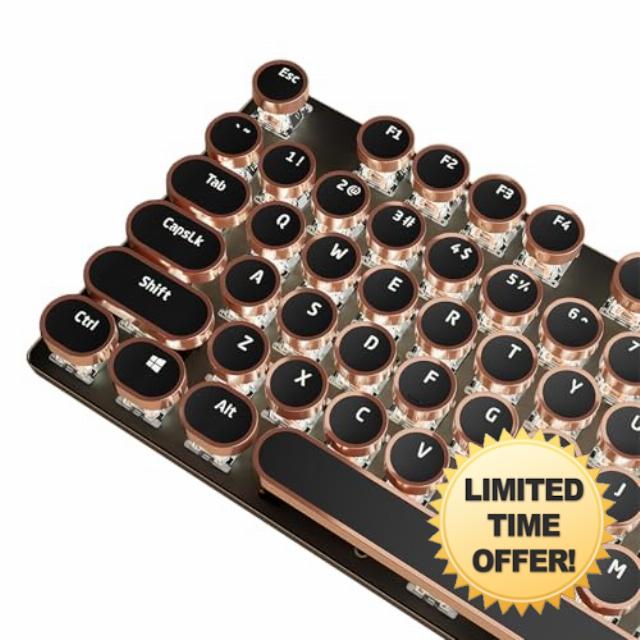
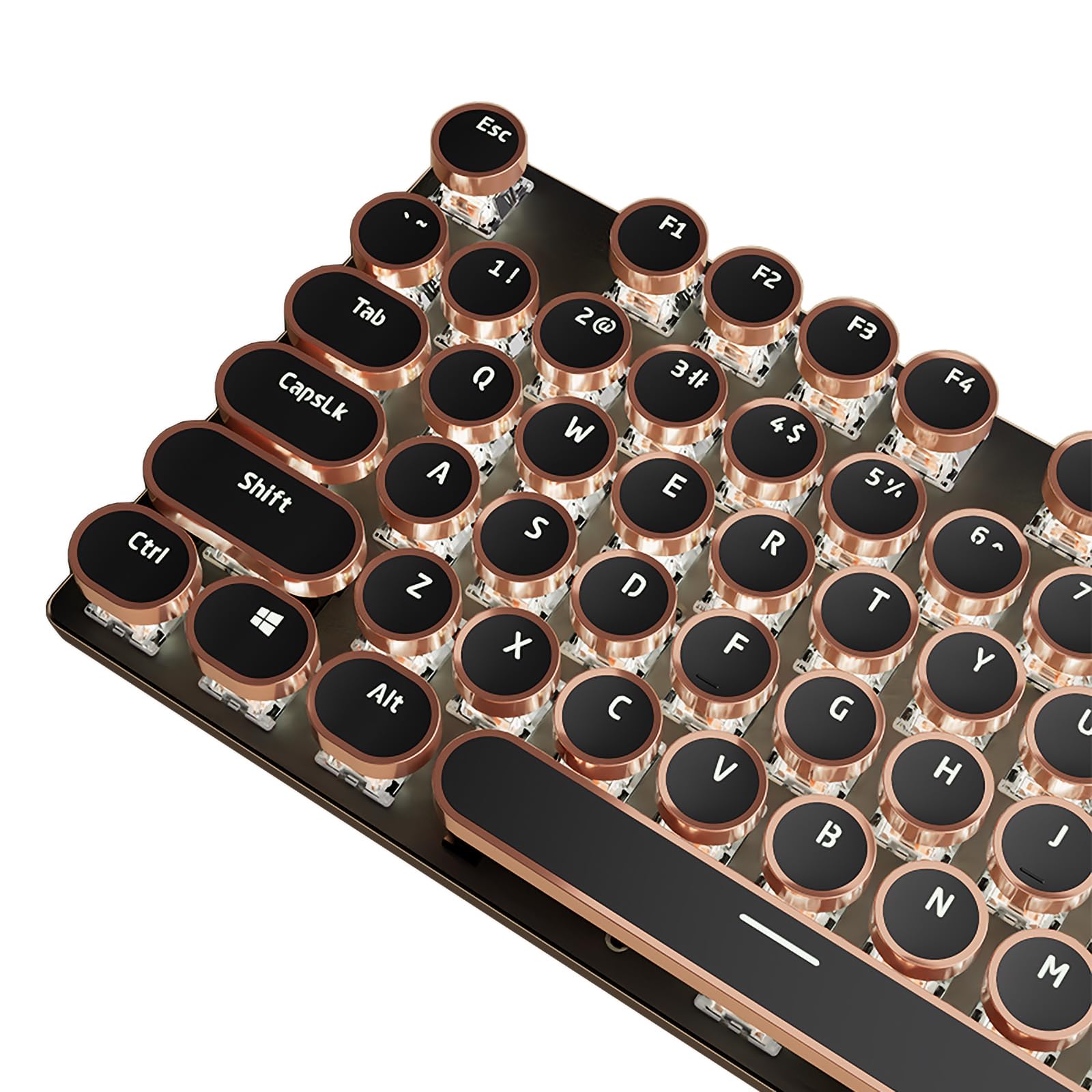
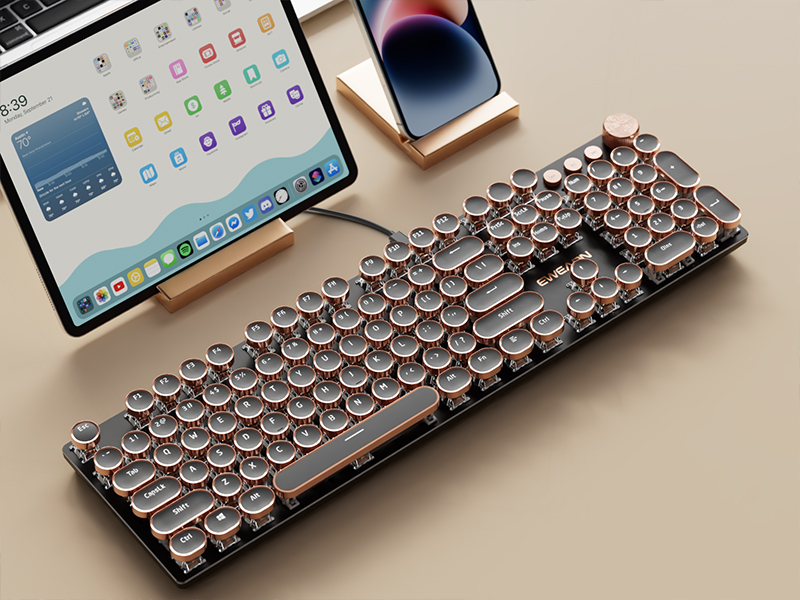
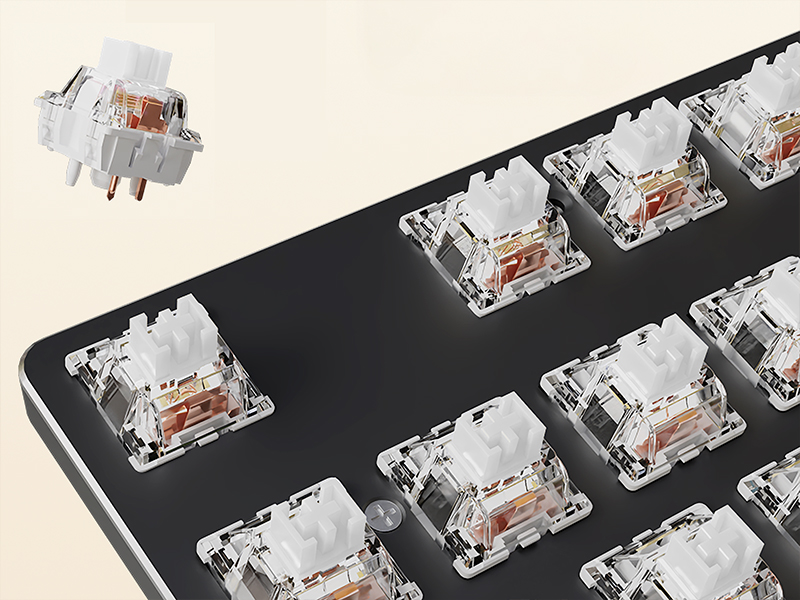
[Retro Typewriter Style with Mechanical Keys] – Vintage steampunk round keycaps with golden rings make this keyboard look like a classical typewriter. The custom white switches feature a smooth linear feeling and fast action with moderate resistance without a tactile bump feel. The sound is quiet when the button is pressed lightly. Combining an aesthetic retro look with advanced technology, this keyboard will give you a unique typing experience.
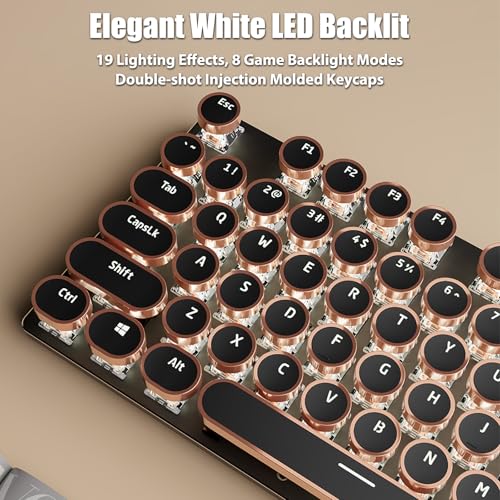
[Elegant White LED Backlit] – This illuminated typewriter keyboard has 19 lighting effects. Press "Fn+Ins" to change the lighting effects. Press “Fn+1~8” to choose the game backlight modes. 5 levels adjustable backlight brightness (Fn+Up/Down) and speed (Fn+Left/Right). The backlight can be turned off at the lowest brightness level. With double-shot injection molded keycaps, offering crystal clear uniform backlighting and lettering that doesn't scratch off.
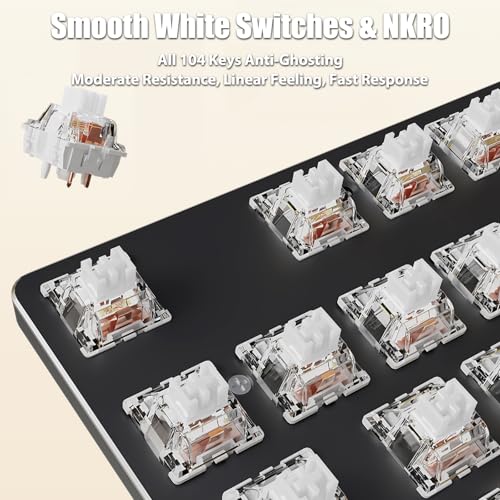
[All 104 Keys Anti-Ghosting] – 104 keys full size keyboard, and all keys non-conflict. Every keystroke is registered during intense gameplay and fast typing, no matter how many other keys are pressed at the same time. Let you enjoy high-grade games with fast response.
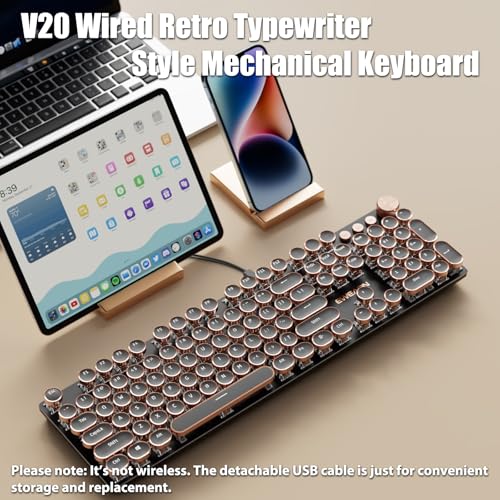
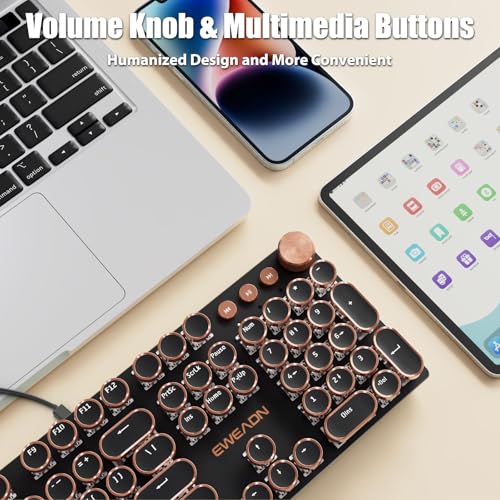
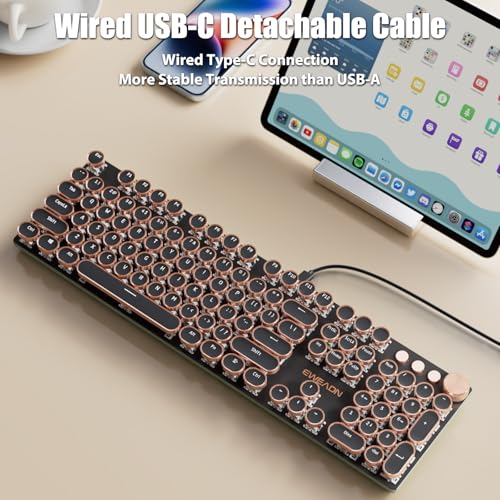
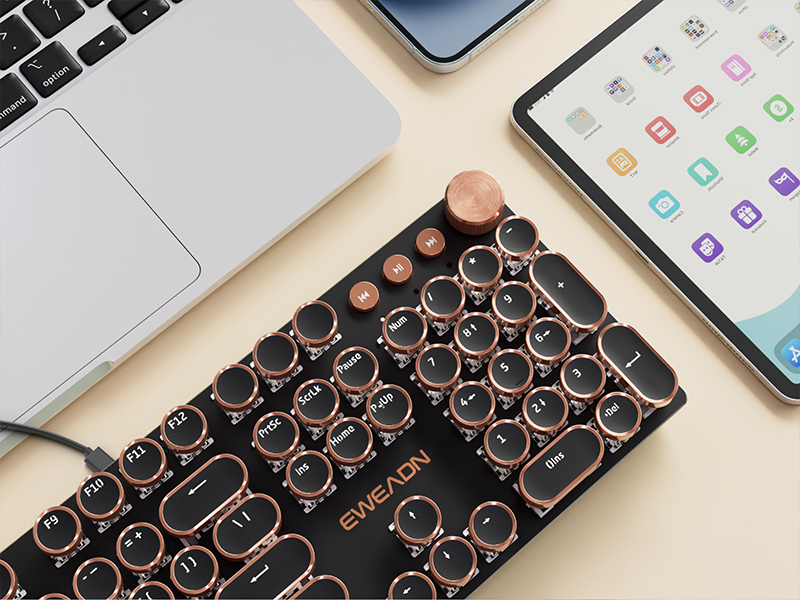
[Wired USB-C Detachable Cable & Volume Knob] – Wired Type-C connection provides the gaming keyboard more stable transmission. Separation of bond wires, volume control knob and 3 multimedia buttons, humanized design and more convenient.
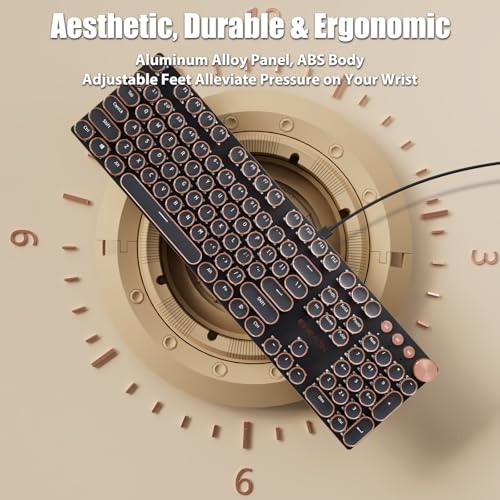
[Durable & Ergonomic] – The keyboard panel was made of top-grade aluminium alloy material, with matte-finish texture, sturdy and robust enough to protect it from scratch. The ergonomic keyboard includes adjustable feet alleviate pressure on your wrist from typing at an elevated angle.
Vintage steampunk round keycaps with golden rings make this keyboard look like a classical typewriter. The custom white switches feature a smooth linear feeling and fast action with moderate resistance without a tactile bump feel. The sound is quiet when the button is pressed lightly. Combining an aesthetic retro look with advanced technology, this keyboard will give you a unique typing experience.
Elegant White LED Backlit
This illuminated typewriter keyboard has 19 lighting effects. Press "Fn+Ins" to change the lighting effects. Press “Fn+1~8” to choose the game backlight modes. 5 levels adjustable backlight brightness (Fn+Up/Down) and speed (Fn+Left/Right). The backlight can be turned off at the lowest brightness level. With double-shot injection molded keycaps, offering crystal clear uniform backlighting and lettering that doesn't scratch off.
All 104 Keys Anti-Ghosting
104 keys full size keyboard, and all keys non-conflict. Every keystroke is registered during intense gameplay and fast typing, no matter how many other keys are pressed at the same time. Let you enjoy high-grade games with fast response.
Wired USB-C Detachable Cable & Volume Knob
Wired Type-C connection provides the gaming keyboard more stable transmission. Separation of bond wires, volume control knob and 3 multimedia buttons, humanized design and more convenient.
Specifications
Model
V20
Connection
Wired USB-C
Cable
Detachable USB A-C Cable Included
Number of Keys
104
Switches
Linear White Switches
Ring of Keycap
Golden Ring
Backlight
White LED
Anti-Ghosting
All 104 Keys Anti-Ghosting
Multifunctional Knob
Lighting Mode + Multimedia Mode
Compatibility
Windows (Fn+W), MacOS (Fn+A)
Dimension
17.1*5.0*1.3in, 43.3*12.8*3.4cm
Net Weight
1.43lb, 0.65kg
Lighting Shortcuts
Fn+Ins
Switch Lighting Effects
Fn+1~8
Switch Game Lighting Mode 1~8
Fn+Up
Lighting Brightness +
Fn+Down
Lighting Brightness -, turn off the lighting at the minimum brightness level
Fn+Right
Lighting Speed +
Fn+Left
Lighting Speed –
Fn+Esc
Press and hold FN+Esc for 3 seconds to restore factory settings
Custom Lighting Recording
Press Fn+9/0 to enter the custom mode, then press Fn+Del to start recording. The indicator light will flash. Press any key to turn it on or off, and then press Fn+Del to save the recording. Then press Fn+9/0 to select the light you set.
Troubleshooting
Connection Problem
(1) Check if both ends of the USB cable are properly inserted. Hold down Fn+Esc for three seconds to restore the factory Settings, then unplug the cable and reinsert it. (2) Test with another USB cable and repeat step 1. (3) Test with other equipment and repeat step 1.
Keys Problem
(1) Press and hold Fn + Esc for three seconds to restore factory settings. (2) Select the correct operating system. Press Fn + W to switch to Windows, and Fn + A to switch to MacOS. (3) Check if there are any foreign objects entering the keys.
Lighting Problem
(1) Press and hold Fn+Esc for three seconds to restore the factory Settings (2) Check if the light is turned on and off. Press Fn+Up to increase the brightness. (3) Press Fn+Ins to switch the light off. (4) Please note that the game mode light levels and custom light levels are not dynamic.
Cable Problem
If the cable end breaks, please request for a replacement.
Lighting Brightness -, turn off the lighting at the minimum brightness level
Fn+Right
Lighting Speed +
Fn+Left
Lighting Speed –
Fn+Esc
Press and hold FN+Esc for 3 seconds to restore factory settings
Custom Lighting Recording
Press Fn+9/0 to enter the custom mode, then press Fn+Del to start recording. The indicator light will flash. Press any key to turn it on or off, and then press Fn+Del to save the recording. Then press Fn+9/0 to select the light you set.
Troubleshooting
Connection Problem
(1) Check if both ends of the USB cable are properly inserted. Hold down Fn+Esc for three seconds to restore the factory Settings, then unplug the cable and reinsert it. (2) Test with another USB cable and repeat step 1. (3) Test with other equipment and repeat step 1.
Keys Problem
(1) Press and hold Fn + Esc for three seconds to restore factory settings. (2) Select the correct operating system. Press Fn + W to switch to Windows, and Fn + A to switch to MacOS. (3) Check if there are any foreign objects entering the keys.
Lighting Problem
(1) Press and hold Fn+Esc for three seconds to restore the factory Settings (2) Check if the light is turned on and off. Press Fn+Up to increase the brightness. (3) Press Fn+Ins to switch the light off. (4) Please note that the game mode light levels and custom light levels are not dynamic.
Cable Problem
If the cable end breaks, please request for a replacement.
Best keyboard I’ve had this for over a year now and it is my favorite keyboard I’ve ever used. I love it so much, it matches the rest of my office, I’ve gotten compliments on it, and I love the new/cute/retro look. I love typing on it so much that I’ve practiced typing for fun a few times a week since I got it and increased my wpm by 30. Used to be around 50wpm now I’m at 80wpm. It’s the highlight of my work day not gonna lie.
LOVE LOVE LOVE!! I absolutely love this typewriter style keyboard. You don’t need to push hard on the keys, they’re very sensitive. It has options to dim the backlight and change the type of lighting effect or you can have the light off completely. Some of the lighting effects are very in your face and I don’t know that I would want them flashing crazy when I’m trying to work, but there are other options where they’re more subtle. Everyone in my office who has seen it has been amazed at how awesome it looks.
Make sure you purchase from a listing that ships within Australia, my first order went through a different seller from overseas and it never arrived. So use this seller, it arrived within a reasonable timeframe
Tried to upload a video of the different lighting options, but it wouldn’t upload but trust me you’ll love it!
Doesn't work long. Very cute product; however the letter O on the product begin duplicating after 3 months of use.
UPDATE: these sellers are amazing!!!! After expressing my disappointment in the product they fixed it immediately! My keyboard works like a gem, and I would recommend anyone who enjoys the soothing and satisfying clickity-clack of a keyboard to buy one today!!!!
Perfect for me! This is not only sooo pretty but I love the clicky sound of the keyboard. You can hear it in my video. The size is great and it has the number keypad on the right which I love. Highly recommended. Only thing, is its not wireless, but I have a wireless adapter for when I move from my desk
Enjoying it, but there were some issues out of the box. I enjoy the look of this keyboard, and there are many lighting options for it. I don’t find the pre-defined lighted gaming layouts to be of any real value, but the lighting effects are very nice even if they only come in white.
When I first took the keyboard out of the box, I noticed that the Windows key and Left Alt key, though labeled as the Windows key and Left Alt key properly, were switched when pressed. I initially thought the board may have been defective but I was able to use Google Lens to translate the [exclusively in Chinese instructions] to find that pressing Fn+W will set the keyboard into Windows mode which will make the two keys function properly on Windows, and pressing Fn+A will set it to Mac mode which was what it was set to by default. Additionally Fn+Insert changes each of the lighting options.
I did find it a little awkward to find the right key when I set the LEDs to be reversed (off by default, lit when pressed) so I ended up going with the functions that have them lit by default.
The keyboard has a good weight to it where it feels very light but sturdy. I enjoyed that the keyboard uses a USB-C connector for the wire as it makes it easier if I have to take the keyboard out on the go without having to wrap the wire around the keyboard.
One other issue I have with it is the dial on the top right, there seems to be much more functionality as you can press it down to click it and it can change the lighting options as well as adjust the audio for your PC. I didn’t translate the manual to find out the exact functionality but it seemed to not function the way I would expect when I have randomly decided to try it. It’s not intuitive basically but I do like the mechanics and look of the wheel and media buttons themselves. Since I typically don’t use the buttons or knob on my keyboard and just ignore them, they at least look nice and match the design so as to not be an eye sore.
My biggest issue is that of a personal taste one. The keyboard uses pink cherry mechanical switches. While the key caps can easily be removed, it seems the keyboard is NOT hot swappable. I’m aware that it never advertised as being hot swappable, but it’s sadly a feature that is sorely missed. As in, if I want to change to my preferred Blue MX Cherry Switches then I believe it means I will have to de-solder each key on the keyboard which is not a quick or easy task for most people, or me for that matter.
I did initially have issues where my fingers would slip or slide on the traction-less keys, where the only texture besides the F and J keys are the rose gold rims of the keys. Even with my big hands the keys can feel very wide and they led to many slips initially. However, in the day I’ve spent using it, I can say that using the keyboard feels more natural to me now. Although I do have the occasional slip up from time to time in a way that I feel it wouldn’t have been a mistype had it been my previous keyboard. In the making of this review I’ve mistyped only two times.
As described So far I love it. Multiple settings to adjust brightness.
It is true that it captures every key pressed, there were moments in which my computer was slow to register it, but I just kept typing and when it registered, it loaded every single letter. This keyboard doesn’t miss a single beat. Supper sensitive as well, it doesn’t take much force for it to register a letter. So far it works well so I’d say the quality is decent, specially for the price. So it’s functional and cute. Love the aesthetic of it and the sound of every key stroke. And it was easy to set up. Comes with instructions in multiple languages.
However, if you’re using it with a laptop I recommend keeping it plugged in if you’re using the backlight as it can drain the battery rather quickly. But I have no complaints on this keyboard.
If any issues arise I will update review in a few weeks, if review is not updated, it means keyboard still works after all this time.
Its gorgeous, smooth and perfect in every way. Omg I love it! As adhd and autistic this thrills me to no end, its tactile and the sound. Reminds me of using my mom’s old typewriter when I was waaaay younge
I’ve had this for over a year now and it is my favorite keyboard I’ve ever used. I love it so much, it matches the rest of my office, I’ve gotten compliments on it, and I love the new/cute/retro look. I love typing on it so much that I’ve practiced typing for fun a few times a week since I got it and increased my wpm by 30. Used to be around 50wpm now I’m at 80wpm. It’s the highlight of my work day not gonna lie.
LOVE LOVE LOVE!!
I absolutely love this typewriter style keyboard. You don’t need to push hard on the keys, they’re very sensitive. It has options to dim the backlight and change the type of lighting effect or you can have the light off completely. Some of the lighting effects are very in your face and I don’t know that I would want them flashing crazy when I’m trying to work, but there are other options where they’re more subtle. Everyone in my office who has seen it has been amazed at how awesome it looks.
Make sure you purchase from a listing that ships within Australia, my first order went through a different seller from overseas and it never arrived. So use this seller, it arrived within a reasonable timeframe
Tried to upload a video of the different lighting options, but it wouldn’t upload but trust me you’ll love it!
Very cute product; however the letter O on the product begin duplicating after 3 months of use.
UPDATE: these sellers are amazing!!!! After expressing my disappointment in the product they fixed it immediately! My keyboard works like a gem, and I would recommend anyone who enjoys the soothing and satisfying clickity-clack of a keyboard to buy one today!!!!
This is not only sooo pretty but I love the clicky sound of the keyboard. You can hear it in my video. The size is great and it has the number keypad on the right which I love. Highly recommended. Only thing, is its not wireless, but I have a wireless adapter for when I move from my desk
I enjoy the look of this keyboard, and there are many lighting options for it. I don’t find the pre-defined lighted gaming layouts to be of any real value, but the lighting effects are very nice even if they only come in white.
When I first took the keyboard out of the box, I noticed that the Windows key and Left Alt key, though labeled as the Windows key and Left Alt key properly, were switched when pressed. I initially thought the board may have been defective but I was able to use Google Lens to translate the [exclusively in Chinese instructions] to find that pressing Fn+W will set the keyboard into Windows mode which will make the two keys function properly on Windows, and pressing Fn+A will set it to Mac mode which was what it was set to by default. Additionally Fn+Insert changes each of the lighting options.
I did find it a little awkward to find the right key when I set the LEDs to be reversed (off by default, lit when pressed) so I ended up going with the functions that have them lit by default.
The keyboard has a good weight to it where it feels very light but sturdy. I enjoyed that the keyboard uses a USB-C connector for the wire as it makes it easier if I have to take the keyboard out on the go without having to wrap the wire around the keyboard.
One other issue I have with it is the dial on the top right, there seems to be much more functionality as you can press it down to click it and it can change the lighting options as well as adjust the audio for your PC. I didn’t translate the manual to find out the exact functionality but it seemed to not function the way I would expect when I have randomly decided to try it. It’s not intuitive basically but I do like the mechanics and look of the wheel and media buttons themselves. Since I typically don’t use the buttons or knob on my keyboard and just ignore them, they at least look nice and match the design so as to not be an eye sore.
My biggest issue is that of a personal taste one. The keyboard uses pink cherry mechanical switches. While the key caps can easily be removed, it seems the keyboard is NOT hot swappable. I’m aware that it never advertised as being hot swappable, but it’s sadly a feature that is sorely missed. As in, if I want to change to my preferred Blue MX Cherry Switches then I believe it means I will have to de-solder each key on the keyboard which is not a quick or easy task for most people, or me for that matter.
I did initially have issues where my fingers would slip or slide on the traction-less keys, where the only texture besides the F and J keys are the rose gold rims of the keys. Even with my big hands the keys can feel very wide and they led to many slips initially. However, in the day I’ve spent using it, I can say that using the keyboard feels more natural to me now. Although I do have the occasional slip up from time to time in a way that I feel it wouldn’t have been a mistype had it been my previous keyboard. In the making of this review I’ve mistyped only two times.
So far I love it. Multiple settings to adjust brightness.
It is true that it captures every key pressed, there were moments in which my computer was slow to register it, but I just kept typing and when it registered, it loaded every single letter. This keyboard doesn’t miss a single beat. Supper sensitive as well, it doesn’t take much force for it to register a letter. So far it works well so I’d say the quality is decent, specially for the price. So it’s functional and cute. Love the aesthetic of it and the sound of every key stroke. And it was easy to set up. Comes with instructions in multiple languages.
However, if you’re using it with a laptop I recommend keeping it plugged in if you’re using the backlight as it can drain the battery rather quickly. But I have no complaints on this keyboard.
If any issues arise I will update review in a few weeks, if review is not updated, it means keyboard still works after all this time.
Its gorgeous, smooth and perfect in every way.
Omg I love it! As adhd and autistic this thrills me to no end, its tactile and the sound. Reminds me of using my mom’s old typewriter when I was waaaay younge