TP-Link Powerline Wi-Fi 6 Extender TL-WPA7817 KIT – Includes
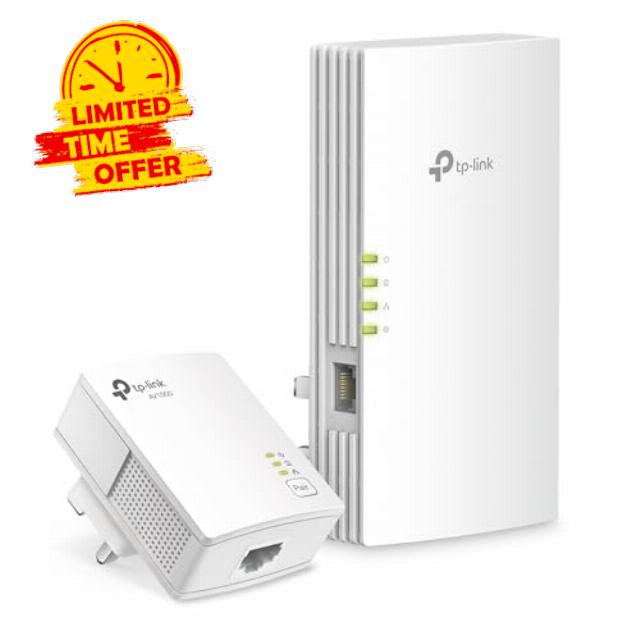
TP-Link Powerline Wi-Fi 6 Extender TL-WPA7817 KIT – Includes AV1000 Powerline Ethernet Network Adapter & AX1500 Dual-Band Wi-Fi Extender, Gigabit Port, EasyMesh,Plug, Pair, & Play, Free Expert Suppo
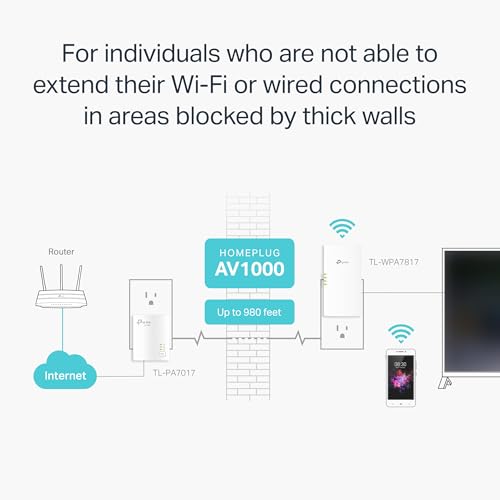
- – This device is meant for individuals that are not able to extend their Wi-Fi or wired connections in areas blocked by thick walls, where routers or range extenders do not work. Speeds cannot exceed your internet plan’s limit.
- , , – Set up the two included powerline adapters for a secure Powerline network, providing fast wired and wireless connections. Please note powerline adapters must be deployed in sets of two or more.
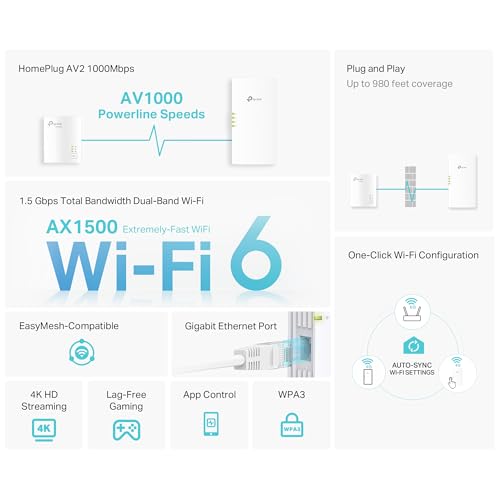
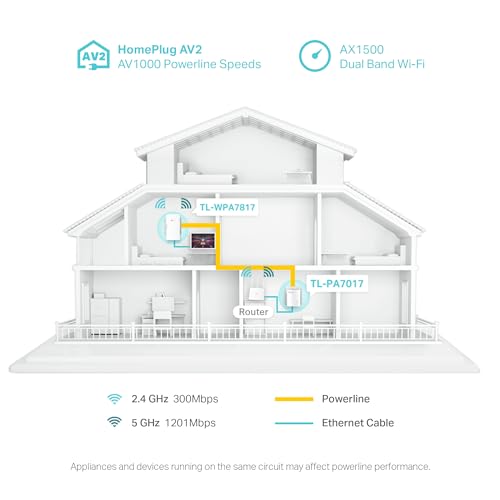
- – Powered by advanced HomePlug AV2 technology, the TL- WPA7817 KIT delivers stable, high-speed Wi-Fi and wired connections, achieving AV1000§ powerline speeds across distances up to 980 feet.
- – – Dual-band Wi-Fi speeds of 5 GHz (1201 Mbps) and 2.4 GHz (300 Mbps) ensure seamless HD streaming, online gaming, and large file downloads without interruption.§ Connect up to 64 devices at a time.
- – Adapters must be on the same electrical circuit for connectivity. Requires direct outlet plug in. Does not work with surge protectors. Speeds may be lower due to wiring quality, adapter distance, and network interference and conditions.
- – Easily create a Mesh network by connecting TL-WPA7817 KIT to an EasyMesh-compatible wifi router/range extender, providing seamless whole-home coverage.
- – – – Instantly clone your router's network name (SSID) and password with the WiFi Clone button. Any Wi-Fi settings adjustments on one powerline adapter are automatically synchronized across the whole powerline network.
- – Delivers reliable, high-speed wired connections for high-bandwidth devices like game consoles and smart TVs. Includes Ethernet cables; increase number of connections with an Ethernet switch (sold separately).
- – Effortlessly control your network with the web interface, user-friendly tpPLC desktop application, and intuitive tpPLC mobile app.
From the brand
Why do millions trust our products?
TP-Link is a U.S.-based global networking leader with over 20 years of experience delivering award-winning reliability.
How do we protect user privacy and network security?
TP-Link is a signatory of the U.S. Cybersecurity and Infrastructure Security Agency’s (CISA) Secure-by-Design pledge, integrating advanced security into every product.
What makes our products unique?
Our products feature advanced technology, from the latest Wi-Fi standards to AI-powered network optimization, helping deliver seamless connectivity to your home or workplace.
-
Wi-Fi 7 Mesh
-
Wi-Fi 7 Routers
-
Mesh Wi-Fi
-
Wi-Fi Routers
-
Access Points
-
Range Extenders
-
WiFi USB Adapters
-
PCIe Cards
-
Network Switches
-
USB BT + Ethernet
-
Festa Networking



| SKU: | B0DTJMJ7MT |
| Weight: | 0.55 Pounds |
| Dimensions: | 3.07"L x 1.33"W x 5.87"H |
| Brand: | TP-Link |
| Model: | TL-WPA7817 KIT |
| Colour: | White |
| Manufacture: | TP-Link |
| Colour: | White |
From the brand


![TP-Link USB C To Ethernet Adapter(UE300C), RJ45 To USB C [Thunderbolt 3/4 Compatible] Type-C Giga...](https://m.media-warehousediscounts.net/images/S/aplus-media-library-service-media/065960c0-b2f0-4137-8e24-21c2da42092f.__AC_SR166,182___.jpg)


It works great so far I put it in a metal shop that I have power ran to from the house. Set up was very simple. I simply plugged the transmitter side into a receptacle near my internet router and plugged in the Ethernet cable from the extender to the router. Went out to the shop and plugged the receiver into a receptacle. Within a minute I had flawless access to WiFi. The receptacle in the house is on a total separate beaker than the breaker that feeds a sub panel in my shop.
Took me over ten years to finally get a stable network connection in my detached garage/gym. I have run two different grade outdoor network cables from my house to my garage, have tried three different wireless extenders and even used my phone as a hot spot, but none of them provided more than a temporary solution with spotty service at best.
Then I spoke with Grok AI and one of the suggestions was to try one of the ethernet over power devices. I had heard of this tech back in my IT manager days but never really thought about it for use in my situation. I was initially going to try the TL-PA9020P and use my existing wireless extender, but decided to go with the TL-WPA7817 kit and keep the existing system I have been using intact…just in case. Plus I was able to get one that was open box for only $55. For reference my garage is about 60 feet from my house as the crow flies, but to run a cable required a 125 feet.
The setup was very easy. I plugged the first adapter into the same outlet that feeds my router and used the provided cable to make the network connection. I plugged the wireless unit into another outlet in the same room for testing and the initial setup. It took about 2 or 3 minutes for the units to sync and then I was able to see the TP-Link device on my wireless network. I also downloaded the tpPLC app which picked up both TP-Link devices. I connected to the device with my laptop and was able to access the internet with no issues.
I moved the wireless device to the garage/gym and used an open outlet over my workbench. Once the indicator light showed the sync was complete, I was able to see it using my Roku system in the garage/gym and logged in using the password on the tag. At some point I plan to change the SSID and PW, which you can do with the tpPLC but for now it works perfectly.
I have an old CRT TV in my garage/gym I use to mainly watch YT videos or stream sports while I am working out, so my needs are low from a data perspective – maybe 20-25 Mbps. When I connected to the system using the tpPLC app I am getting 108 Mbps which is way more than enough for my use.
I cannot recommend this system enough for a situation similar to the detached garage scenario I have. Setup was super easy. The equipment is well made…like most TP-Link hardware I have used in the past, and even at the regular $80 price point it’s well worth the cost.
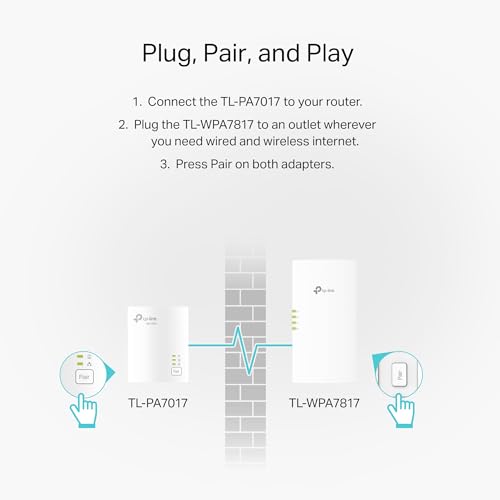
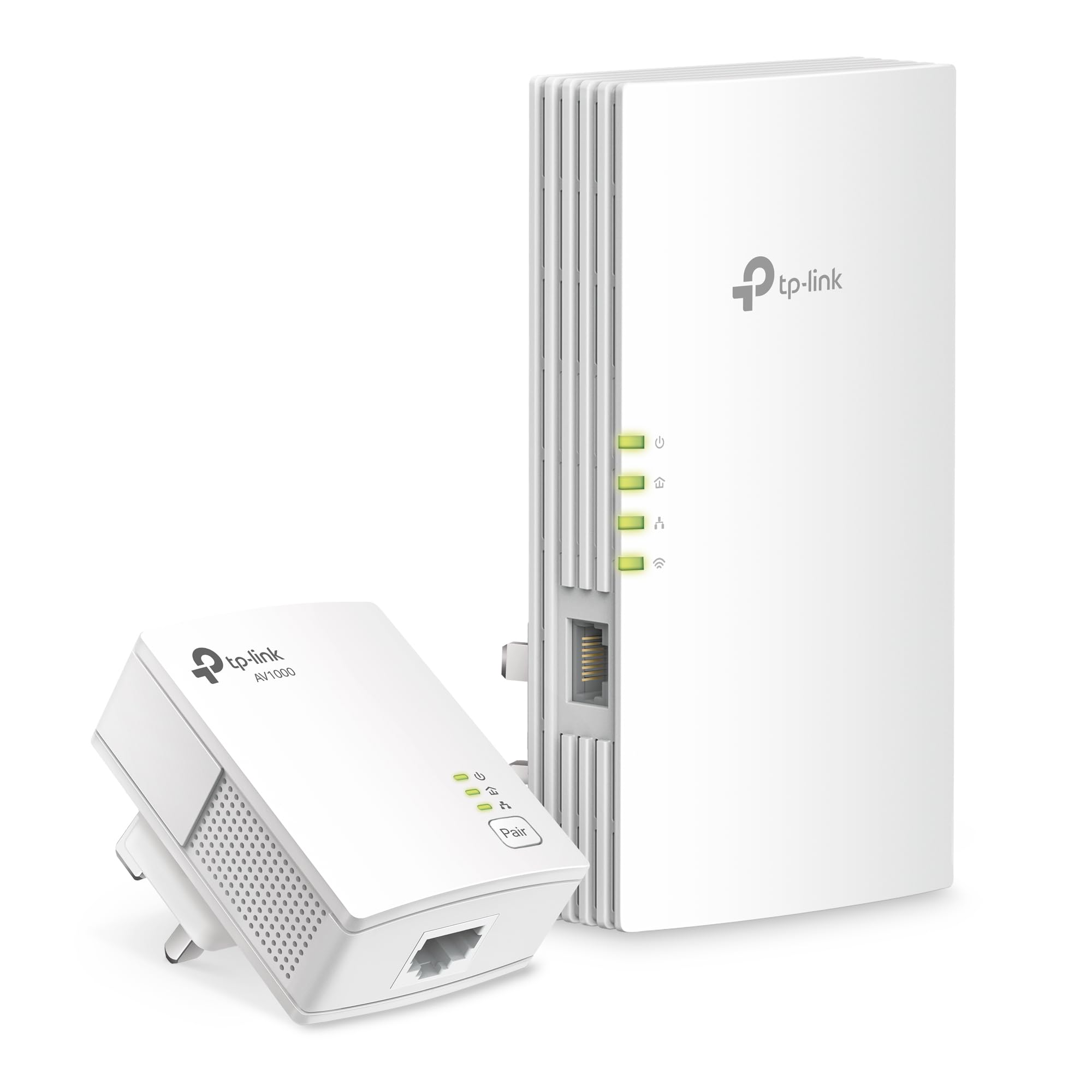
It’s always nice to find something that just WORKS, without a lot of complicated fuss or having to wrestle with dodgy, badly-designed “apps” to get it to do anything useful! This gizmo is pretty much just plug-and-play; you just plug the “network link” device (the smaller one) into an outlet somewhere near your modem or router, connect it with an ethernet cord, then plug the larger “access point” device into any suitable outlet elsewhere in the house where you need WiFi coverage, and let them find each other. The unit has a built-in web UI, so if you need to tweak the configuration for any reason, you can just do it right from your PC’s web browser without having to install an “app” on your phone or anything like that.
Performance-wise, I can’t complain. Obviously, going through your house wiring isn’t going to be as fast as a true CAT5e ethernet connection, but as a way to extend your WiFi coverage, it gets the job done. (Theoretically, it can reach gigabit speeds, but I expect that will depend greatly on how good your house wiring is.)
Wasn’t sure this was going to work for my situation. I put this in my garage which is approximately 200 ft from my house. Metal building, so reception inside is slim to none. I run this through the power line option. Works good once you know which leg in the garage you need to use. The only thing that seems to interfere with it is when my welder is plugged in, but once it’s off it works again. It’s by no means super fast but I can send pics from inside the garage with all the doors closed. It was easy to pair inside the house. So far it’s been worth the money since I was in to big a hurry to run ethernet cable when running my electric.
I decent powerline extender. Don't expect GB speeds.
I’ve tried 3 other powerline extenders, and this is the best of them. Still not great — even on a short distance of about 30 feet (though a heavy brick wall) I only get about 300Mbps through. Powerline networking remains a bit of a black art. If you can run a Cat 6 directly, you’ll be much happier.
We have a building on the lot that we use as a crafting shop and workshop. For some of the stuff, access to the internet is helpful. Running a cable underground would have been troublesome. Running an antenna system would have been too expensive. This was the cheapest and most effective. Now in the Craft shop, we can either use WIFI or Ethernet. The WIFI signal strength is great and covers the whole quarter acre. Look, ma, no wires.