Mobapad Chitu2 HD Switch 2 Wireless Controller, TMR Glide
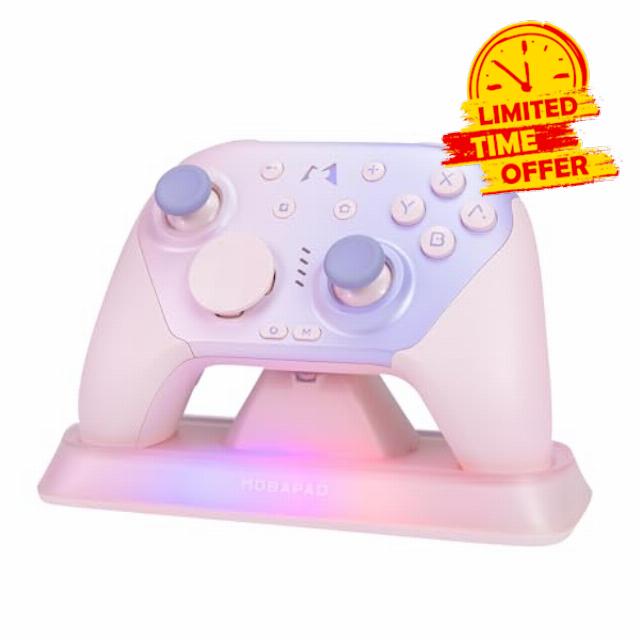
Mobapad Chitu2 HD Switch 2 Wireless Controller, TMR Glide Joysticks [ZERO Drift], Charging Dock, HD Rumble, NFC, Turbo, Programming, Mechanical Buttons – Gamepad for Nintendo Switch/Switch 2 & Windows PC
- 【Next-Gen TMR Glide Joysticks】Uses the latest TMR technology combined with an LSR liquid silicone ring and inverted stick cap structure. Utilizing non-contact magnetic sensors, Provides smoother control than Hall Effect sticks, and a butter-smooth feel and zero-drift performance,. Ensures smooth, drift-free performance and pinpoint accuracy for competitive gaming.
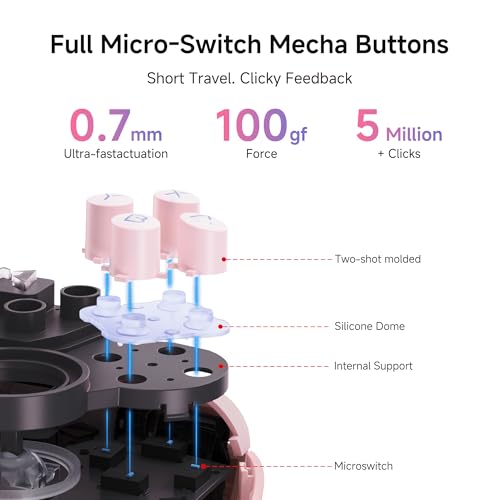
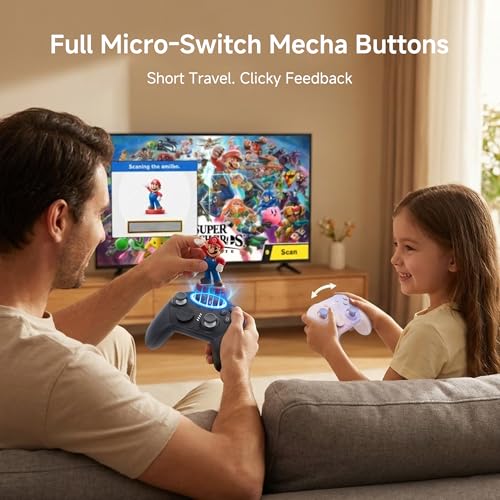
- 【Instant Tactile Feedback】 Equipped with premium mechanical micro-switches featuring an ultra-short 0.7mm actuation distance. Experience a crisp, "clicky" tactile response and elite response times with a massive 5 million+ click lifespan for ultimate hardware reliability.
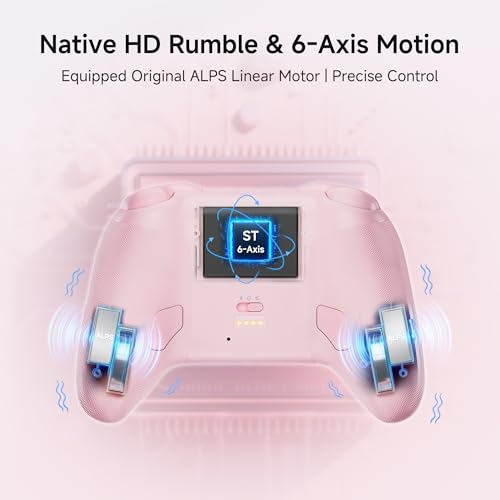
- 【Linear HD Vibration】 Equipped with premium dual ALPS linear vibration motors, providing multi-layered and high-frequency tactile feedback. Delivers realistic physical sensations that bring every in-game environment to life.
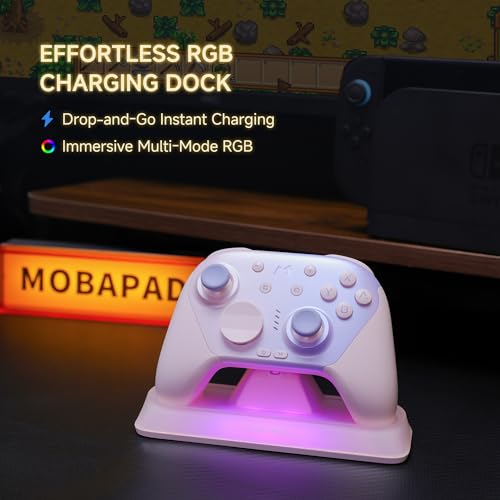
- 【Ultimate Power Freedom】: Ditch power anxiety with a 1,000mAh battery for 15-20 hours of action. Fast charge in 2.5 hours using the RGB Smart Dock with auto-sync, or use the included cable to play while charging. Whether you "drop & charge" for convenience or play wired during marathons, your Switch 2 is always ready.
- 【NFC & 6-Axis Motion Control】 The built-in NFC reader offers 100% compatibility with amiibo figures, allowing you to unlock in-game rewards instantly. Integrated with a high-precision 6-axis gyroscope, it delivers fluid motion tracking and immersive aim control for a truly interactive experience.
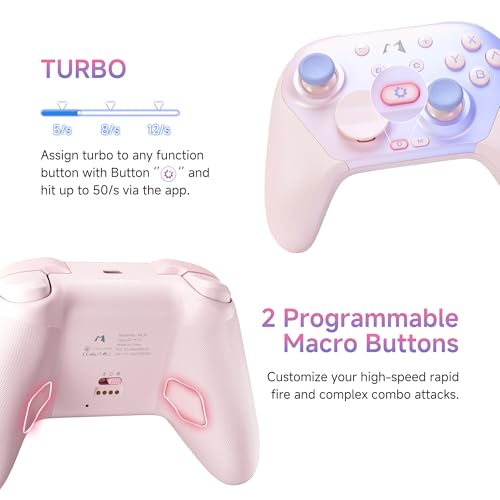
- 【Dual Programmable Macro Buttons】 Features 2 programmable back buttons that support complete button remapping and macro recording. Simplify complex combos and execute multi-button sequences instantly to gain a competitive edge in fast-paced action games.
- 【Ergonomic Grip & Swappable D-Pads】 Engineered with an ergonomic contour and comfortable grip specifically for marathon gaming sessions. Includes easily swappable disc and cross-style D-pads, allowing you to customize your control setup for any game style in seconds.
- 【Universal Support】 MOBAPAD Chitu2 HD Switch Controller compatible with Switch 2. Supports seamless mode switching for PC, mobile, and mainstream gaming platforms, ensuring hassle-free cross-platform connectivity.
MOBAPAD Chitu2 HD wireless controller is engineered for precision and durability. It features next-generation TMR glide joysticks for a butter-smooth, zero-drift experience and premium mechanical micro-switches with an ultra-fast 0.7mm actuation distance. The built-in 1000mAh battery delivers 15-20 hours of continuous playtime on a single charge and supports playing while charging for uninterrupted sessions. Designed for versatility, it is fully compatible with Switch 1/2, PC, Android, and iOS, featuring a one-tap remote wake-up function and seamless mode switching. Advanced features include a built-in NFC reader for interactive sensing, a 6-axis gyroscope for precise motion control, and 2 programmable back buttons for custom macros. With authentic ALPS linear HD vibration and an ergonomic fatigue-free grip, this controller provides a truly immersive and comfortable gaming experience.
![TMR Glide Joysticks [ZERO Drift]](https://warehousediscounts.net/posts/wp-content/uploads/2026/03/41WzmYbo7cL.jpg)
| SKU: | B0G91VQB6N |
| Weight: | 200 Grams |
| Dimensions: | 5.79 x 3.98 x 2.64 inches |
| Brand: | MOBAPAD |
| Colour: | Pink |
| Manufacture: | MOBAPAD |
| Colour: | Pink |
Awesome controller for my Switch 2!
I got this controller mostly to use with my Switch 2 but also to use as a Bluetooth controller on my PC or phone. So far it works great for both of these use cases and I am quite happy with the controller.
The controller itself is a little bulkier than a traditional Pro controller or Xbox controller, it feels wider in my hands. Personally I like this extra bulk, I find it super comfortable to hold. The back part where my fingers rest is textured helping with the grip while the front where my palms sit is smooth and comfortable. The buttons are super clicky, almost sound like a mouse click which I like. The best part for me though is the sticks, they feel fantastic! They seem to slide and glide freely while keeping me in full control, I love these thumbsticks. There are two paddles at the back, personally I don’t really use these but nice to have them. However I do find them a bit low requiring my ring finger to use the buttons. The D-Pad comes with a detachable circle as well as a traditional D-Pad shape. Swapping it out is super easy. Unfortunately there is no dedicated space to keep the spare so can easily get misplaced. The charging base is nice, keeps the controller propped up and charged when not in use. It has RGB lighting in the base which I think looks cool but as far as I can tell there is no way to turn them off, this could be an issue if the controller is in a bedroom or something. Pairing the controller was very easy and has a dedicated toggle switch on the back to switch between Bluetooth mode or Switch mode, this I love!
Overall I really like this controller, I got the pink one and I think it looks great! It is comfortable to use, easy to pair, rechargeable, includes a base, and honestly feels great to use with the thumbstick and buttons. I think this is a great controller that doesn’t break the bank!
NS or PC wireless gaming controlle
This wireless controller has a lot of style, but a lot of design quirks that make it a middle of the pack choice for your controller needs.
Overall, I don’t have many issues with the controller itself or the charging base. Style-wise, it is lovely. The pink and purple gradient is super cute and the RGB lighting is always a welcome addition for those who like a little colour but this is only present during charging, sadly.
Construction is excellent. The plastic is comfortable and not the least bit cheap feeling. It’s clear that a lot of care was put into the construction of this product. It’s too bad the same can’t be said of the programming design choices.
Extremely welcome features like a toggle switch that changes from the powered off state to Bluetooth mode or NS mode are countered with strange and confusing settings like needing to hold the M-logo while pressing right on the D-pad to initiate pairing mode. Or the quick-swappable physical D-pad style options being met with the inability to quick change/invert the default NS key binding buttons to the more standard confirm/cancel format for game controllers with a similar toggle switch.
I can’t fault the controller for doing its own thing, but when this is marketed as a pro controller I expect it to exceed my expectations and it just narrowly failed in doing so. This is a fine controller, but lacks features and quality control on the programming side of things.
Excellent controller with good feel, satisfactory joystick/button travel, dock is great for charging
I got one of these for one kid, and the other kid keeps stealing my controllers so I got them this one, with a dock.
Came almost to 85%, so I charged it to the rest of the way to 100%. Kid is primarily using it on their PC rather than any console, and it was easily synced to her PC with BT, although usually BT controllers have more latency than 2.4Ghz ones she never complained about issues with BT at all.
D-pad can be used with the angled circular hat, or you can replace it with a normal 4 way pad that comes in the box. The joysticks and buttons have a really satisfying feel to them, and the controller is very comfortable in the hands for long game sessions. Battery life with several hours playing required the controller to be recharged, but with a USB-C block that supports quick charge/high amperage it hardly took any time at all. The dock is a welcome addition, leaving a space to actually put the controller down to charge between games or long sessions ensures it’ll always be ready.
Overall, much like the other I picked up, this works well – an advantage for this controller is that if she picks up a Switch 2 then she won’t need to get a Switch 2 Pro controller, just need to flick a switch to pair this.
Came charged to about 80%, so kid used it almost immediately. Was a breeze to sync to her Switch 2, and she played several games (Mario Kart, Zelda ToTK, and Animal Crossing to see if she preferred it over the joycons). After half a day of playing, she noted that the battery life was great, and the really likes how the feel of the controller will lend itself to long playing sessions as it’s very comfortable. The controls were very smooth, with no sticking.
The only problem she had was setting it up so that she can wake the Switch 2 with it. There’s a specific fix that you can lookup a video for, it’ll explain how to fix this which she did without any issues, and the controller wakes up the Switch 2 without any problem.
Overall. A quality build, and would recommend for the gamer in your life.
An absolutely fabulous controller for the Switch 2 now with its own dock
I’ve previously tried the standalone Mobapad Chitu2 HD Swith 2 wireless controller in black colour, absolutely loved that controller having used multiple third party brands of controllers as well as the Nintendo Pro Controller. What makes the Mobapad controller stand out from its peers is the mechanical construction of its controllers. There is an extremely satisfying mechnical click on all the buttons, back/shoulder buttons, similar to the kind of feeling you get on a clicky mechanical keyboard. This really makes other controllers feel plain in comparison and the feedback is just an excellent feeling to have while gaming.
The sticks are completely drift-free which is an absoutely essential feature to have in this day and age. Controllers that don’t offer anti-drift should not even be considered in 2026. Out of the box, I hooked up the controller via the supplied USB-C cable to a third party dock to initially pair with my Switch 2, and from there on it was able to just wireless pair on its own with no further physical connection required. Extremely easy to use, no additional software or firmware updates required, 100% plug and play.
The standalone dock is a nice touch, as it keeps a tidy look and gives the controller a dedicated resting place that also charges it. The dock also has a basic RGB lighting effect built-in, and while the official manual says that the RGB should auto shutoff once the controller is fully charged, I left my controller on to charge overnight and the RGB was still on the next day in the afternoon. Not really a big deal, but there seems to be no way to shutoff the RGB effect. Besides this, the controller is great in the hands, feels premium and offers an excellent gaming experience on the Switch 2. Absolutely no complaints to make.
Buttery smooth thumbsticks, tactile button heave
I have been testing this controller for a few days, and the thumbsticks are easily some of the smoothest I have used. They have a silicone ring around the edges that allows for perfect gliding, and it luckily gets rid of that loud knocking sound when you push the stick all the way to the edge. Every button on the face uses a microswitch, which gives a very satisfying tactile response. They feel responsive and clicky without being so loud that they bother anyone nearby. The soft pink colour looks sharp with the subtle gradient on the faceplate, and the matte plastic is a nice touch because it does not show fingerprints.
In terms of performance, the Amiibo NFC functionality works exactly as it should, and the HD Rumble is actually a bit stronger than what I get from my Pro Controller. Having the rear buttons mapped to A and B by default is convenient, but having the option to reconfigure them through the app is even better. It also features Bluetooth, so I was able to get it working with my PC and Steam Deck quite easily. I prefer a traditional D-pad over the circular style, so I was glad to see a regular one included in the box that I could swap in myself.
The rumble is not the newest version available, but the difference is so small that most people probably will not even notice it. One minor annoyance is the charging light on the dock, which stays on and is quite bright in a dark room. To get the wake up feature working on a Switch 2, you need to turn the controller on and then hold the home button for ten seconds to enter pairing mode while you are in the Change Grip Order menu. After it pairs, you must immediately disconnect the Left Joycon 2 from the console. The light on the controller will flash blue to show it is ready to wake up the system.
This is one of the nicest controllers I have ever used and I would highly recommend it.
Best Switch 2 controller! Beats Switch 2 Pro Controller! More premium parts at half the price!
Bought one and then came back a couple of days later and bought another! They are that good! Best Switch 2 controller. Ok for anyone who has used the Switch2 pro controller knows how buttery smooth it is, but you also know how expensive it is. Especially when it comes to the features as it is susceptible to stick drift due to having standard sticks. So the Nintendo Switch 2 pro controller feels nice, longevity is a question.
In step Mobapad! Holy smokes where do I start?! First the sticks on this have that buttery smooth feeling like the Nintendo Pro Controller due to also having silicone dampeners in the stick. However, where this destroy that controller is the fact they are using premium sticks as they are TMR sticks! Which for those who don’t know are the best sticks you can get as they are virtually immune to stick drift and are highly accurate. On top of that all of the buttons are tactile mechanical buttons. So opposed to most controllers that use a membrane based button which can be squishy, these have a satisfying click. Like a mouse click. Now with that being said mechanical buttons are not silent due to that click. However they are faster to respond, and last way longer than standard membrane buttons.
Did I mention you get all of these features in a controller that is literally half the price of the Nintendo one?! Don’t buy a Nintendo Official Pro Controller on Switch 2, buy two of these instead! Forget the days of old where 3rd party controllers were so inferior to official ones. In today’s age we have some choice with great alternatives and these are at the top of that mountain!
If you are not familiar with Amazon Vine, it is basically Amazon trading free* products for honest reviews. You see a lot of Vine reviews that are cookie cutter and based on templates. I aim to make my reviews honest and non-cookie cutter (other than this intro and disclaimer).
* These items are not actually free as Vine members pay income tax on the items they receive. Therefore, I will never order something from Vine unless I actually intend to use it. I think this is important for readers to understand because it means I will never order an item just to provide a fake five star review to a company. If I review something as good, it means I actually enjoyed using it or it fills its intended purpose correctly. Items that don’t meet my expectations will be reviewed accordingly.
Why I ordered this item: I’ve been through a few Pro controllers and they all developed stick drift within a year. This one advertised TMR joysticks and zero drift, so I figured it was worth trying something different.
Likes:
* The mechanical buttons have a really satisfying clicky response. It’s crisp and snappy, which is great for games where you need fast inputs. They feel totally different from the mushy buttons on Nintendo’s controllers.
* The joysticks are smooth. I was skeptical about the TMR technology, but they do glide way easier than Hall Effect sticks I’ve used before. No notchy feeling at all.
* The charging dock is a nice inclusion. Just drop it in and it sits there looking fine on a shelf next to my TV. Way less annoying than digging for a cable.
* You can remap buttons and record macros on the back paddles, which opens up some options for games that benefit from that. I don’t use it constantly, but it’s there when I need it.
* Build quality is solid. This thing feels like it can take a beating without falling apart.
* It’s cheaper than a Pro Controller by a decent margin, which matters if you’re the type to go through multiple controllers.
No likes:
* The battery doesn’t last as long as I’d hoped. Twenty hours tops, and that’s if I’m not hammering it. Standard controllers last longer and it’s a noticeable difference if you’re doing longer sessions.
* This controller has a different weight and shape than what I’m used to, and it took me a bit to adjust. The grip contour is fine once you get used to it, but the transition was rougher than I expected.
* It’s not cheap.
Would I pay full price for this product: Yeah, but mainly because the stick drift issue on Pro Controllers is so aggravating that paying less for something that doesn’t have that problem yet feels like a win.
Final thoughts: This is a solid third-party controller that does what it sets out to do. The mechanical buttons and joysticks are nice, and the price makes it feel like less of a gamble than dropping eighty bucks on another official controller that might drift in a year anyway.
Supurb mechanical switch gaming pad with RGB docking statio
This is my second controller from Mobapad. My first one was also a Chitu2, but it didn’t include the charging dock, so I was glad to see this black version comes with one. Having a dedicated dock makes a big difference. Now I can rotate between this one and my pink controller and black one, and always have one topped off and ready to go, or have a second or third player jump in.
Just like my first Chitu2, this one has macro customization and mechanical buttons. The mechanical micro-switches give a very crisp, clicky feel that’s noticeably different from a standard membrane controller. The response time feels fast and precise, and the TMR glide joysticks are incredibly smooth. I haven’t experienced any drift issues on my other controller, and this technology shouldn’t have any, but only time will tell. The sticks feel tighter and more refined than those on a typical OEM Switch Pro controller; however, they are also taller, which feels odd at first, but I quickly got used to it.
Feature-wise, it does everything the regular Switch Pro controller can do and then adds more. You get NFC support for amiibo, 6-axis motion control, HD rumble, turbo functionality, and dual programmable back buttons. The macro programming is especially useful if you play games that require repetitive inputs or combos. The swappable D-pads are another nice feature, letting you tailor it depending on whether you’re playing platformers, fighting games, or something more casual.
Build quality is superb. It feels solid and well put together, not hollow or cheap. The dock is convenient, with a drop-and-charge design, and keeps things looking clean instead of having cables scattered around.
Battery life is probably my only real downside. It’s rated for 15 to 20 hours, and in practice I find myself charging it more often than some of my other controllers. We play our Switch almost every day, so I was charging my previous Chitu2 about twice a week. Compared to other controllers I own that might last two to three weeks on a single charge, this one definitely lasts shorter. That said, the dock makes frequent charging much less of a hassle.
At around 65 dollars, it’s on the premium side, but it’s still less than an OEM Pro controller and offers more features. Between the TMR sticks, mechanical buttons, macro support, and included charging dock, I’d say it’s absolutely worth it if you want an upgrade over the standard Switch controller.