Acer Gadget Mac Mini M4 Dock, 8TB M.2 NVMe/SATA SSD
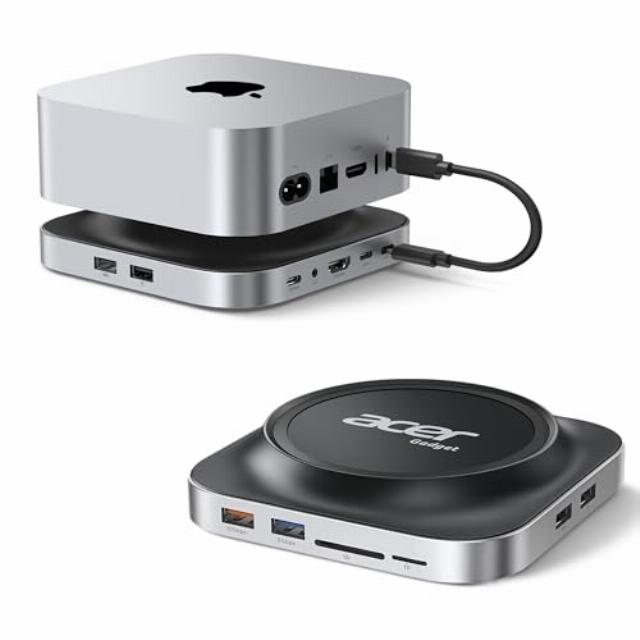
Acer Gadget Mac Mini M4 Dock, 8TB M.2 NVMe/SATA SSD Enclosure & Stand, 4K@144Hz HDMI, 10Gbps USB-C & USB-A Hub, SD/TF Card Reader, 3.5mm Audio, Aluminum Docking Station for Mac Mini M4 & M4 Pro, Black
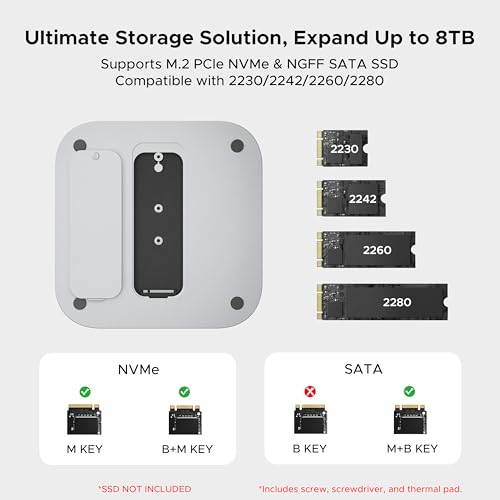
- [Ultimate Storage Expansion for M4/M4 Pro] Boost your Mac Mini capacity instantly. Supports up to 8TB M.2 PCIe NVMe & NGFF SATA SSD and is compatible with all standard sizes (2230/2242/2260/2280) and interface keys (M-Key/B&M Key). It handles everything from high-res video editing to massive backups. Say goodbye to "High Costs of Internal Upgrades" and enjoy professional-grade expansion directly under your device.
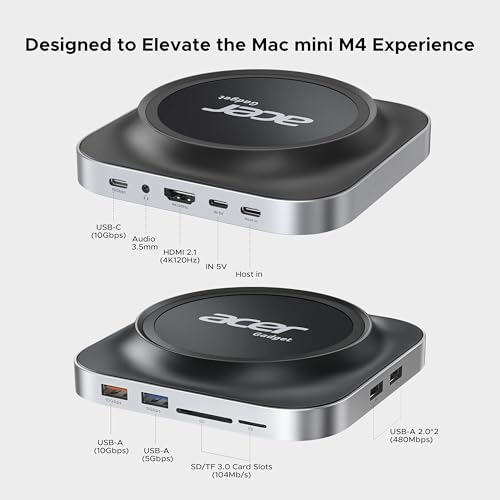
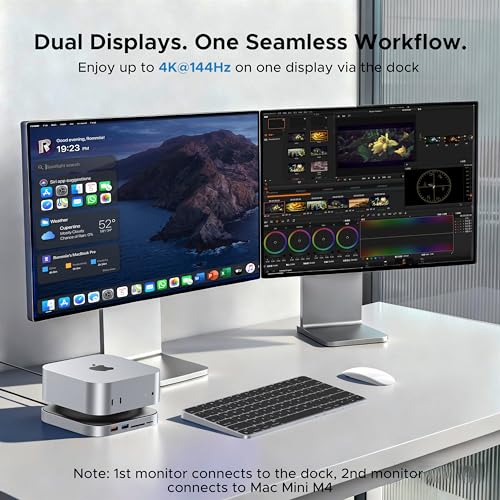
- [Cinematic 4K@144Hz] Create a dual-screen workstation using HDMI 2.1 (up to 4K@144Hz) and the Mac Mini's HDMI port to extend your Mac Mini M4 workflow. Featuring HDR support for stunning color depth and accuracy, it delivers a truly immersive visual experience. Ideal for professional creative projects and applications requiring high refresh rates. (Note: Actual performance (4K@144Hz/HDR) depends on the specifications of your connected monitor and HDMI cable.)
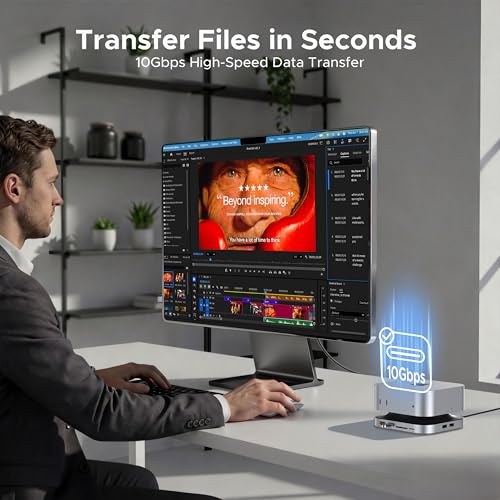
- [10Gbps Workflow Accelerator] Equipped with ultra-fast 10Gbps USB-C & USB-A ports, this dock transfers massive files in seconds—ideal for 4K video editing and seamless data backups. The integrated SD/TF card readers support up to 104MB/s, allowing photographers to offload high-res media without the wait. This Mac Mini accessory brings essential connectivity to your fingertips, eliminating the need to reach behind your M4 Pro setup.
- [Zero-Lag Wireless & Desktop Aesthetics] Optimized for the 2.4GHz environment, a dedicated side USB 2.0 port effectively shields your wireless receivers from common USB 3.0 interference, keeping your mouse and keyboard responsive and stutter-free. Additionally, a rear-mounted 3.5mm audio output supports external speakers while keeping cables routed behind the dock—reducing clutter and preserving a clean, minimalist workspace.
- [Elevated Airflow & Thermal Management] Elevated design creates a high-velocity airflow channel to prevent thermal throttling, keeping your Mac mini performing at its peak and enabling easy access to the power button—no lifting required. Crafted from premium aluminum alloy, the casing acts as a massive passive heat sink for your internal SSD, significantly reducing operating temperatures and extending drive longevity.
- [All-in-One Complete Solution] NO MORE EXTRA TRIPS TO THE STORE OR HIDDEN COSTS. This kit provides everything for a seamless setup: 1× Mac Mini M4 Dock, 1× 23cm USB-C Cable, 1× Screwdriver, 2× Thumb Screws, 1× Thermal Pad, and a dedicated 5V/3A Power Adapter. We’ve handled all the details so you can enjoy a clutter-free, ready-to-use workspace straight out of the box. (Not Included SSD)
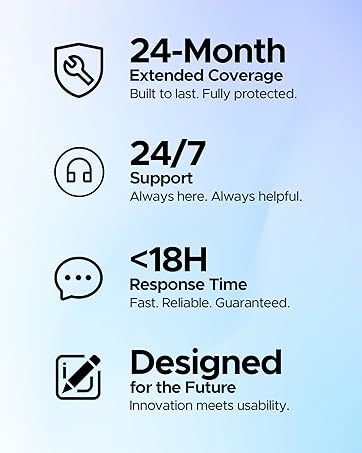
- [Quality Assurance] Your satisfaction is our priority. Our dedicated support team is committed to providing a seamless experience and will respond to all inquiries within 18 hours. (PRO TIP: Use a 5V/3A power adapter to ensure stable performance for the 8TB SSD and all ports, preventing disconnections during heavy workloads.)
From the brand
Acer Gadget is a subsidiary company of Acer Inc.,
A top global information and communicationtechnology enterprise. Acer Gadget aims toprovide different products, services, andsolutions across a variety of industries to enabledigital transformation and improve customerlifestyles.
Featured Brands: Acer, Nitro, emachines, e10,Pawbo, Xplova
-
13-IN-1 Docking Station
-
Car Phone Holder
-
Bluetooth Receiver
Usage Tip
Please connect a 5V/3A power adapter before using the docking station. A consistent power supply is essential for ensuring long-term stability.
What kind of support do you offer if I run into technical difficulties?
We pride ourselves on our dedicated support team. Whether it’s a connection, setup, or compatibility query, our experts are on standby to provide 1-on-1 solutions within 24 hours. Your seamless experience is our top priority.


| SKU: | B0GGZ44MYN |
| Weight: | 14 ounces |
| Dimensions: | 9.06 x 6.42 x 1.85 inches |
| Model: | ODK5R0 |
| Manufacture: | acer |
From the brand


Usage Tip
Please connect a 5V/3A power adapter before using the docking station. A consistent power supply is essential for ensuring long-term stability.
What kind of support do you offer if I run into technical difficulties?
We pride ourselves on our dedicated support team. Whether it’s a connection, setup, or compatibility query, our experts are on standby to provide 1-on-1 solutions within 24 hours. Your seamless experience is our top priority.
Don't miss this versatile dock for your Mac mini
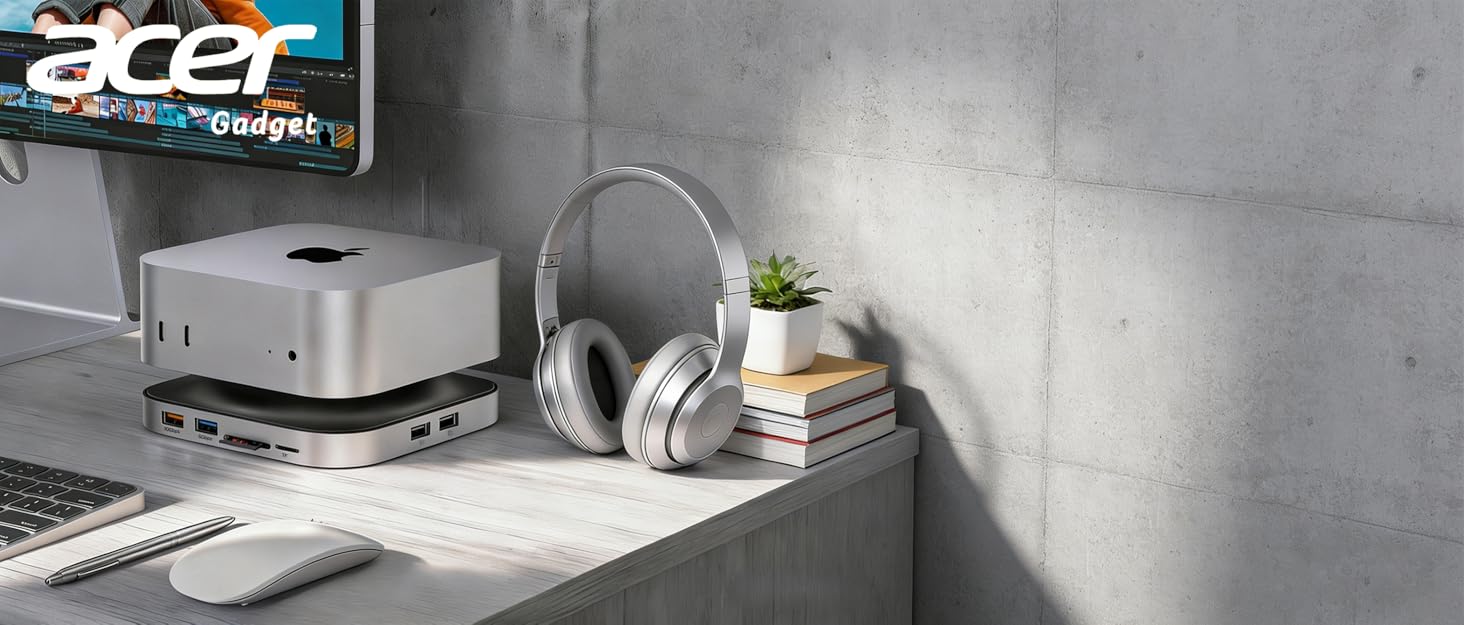
I am very pleased with this docking station on my new Mac mini. The dock is made from solid aluminum and matches the Mac mini almost perfectly in color and finish. The design is also really thoughtful. The dock sits perfectly under the Mac mini and uses anti-slip pads to keep everything stable. When stacked under or beside the Mac mini, it honestly looks like it came straight from Apple. The aluminum body also helps dissipate heat and keep everything cool during long work sessions, which is a nice bonus. With the dock connected through a single USB-C cable, I now have multiple additional ports available right at the front of my desk. I am a big fan of clean look. Instead of having multiple adapters and hubs plugged into the back of the Mac mini, everything runs through one sleek docking station. The Mac mini sits neatly on top, and the dock almost looks like an extension of the computer rather than an accessory.
Clean Setup and Extra Ports for My Desk
I got this dock to go with my Mac mini because I was running out of ports and my desk was starting to feel cluttered. The dock fits neatly under the Mac mini and the aluminum finish matches the look pretty well, so it doesn’t look out of place on the desk.
Setup was simple. I connected it with the USB-C cable and everything worked right away. I’ve been using the extra USB ports for a keyboard, flash drive, and a small external drive. The SD card slot has also been handy when I need to move photos from my camera to the computer.
The dock feels solid and keeps everything organized in one spot instead of having cables all over the desk. After using it for a while during normal work and file transfers, it’s been working smoothly without any issues.
Clean Setup and Surprisingly Powerful Little Dock
This dock fits perfectly with the Mac mini and almost looks like it was designed to be part of the computer. The aluminum body feels solid and well finished, and the black color blends in nicely with a desk setup. It has a good weight to it, so it stays put instead of sliding around when plugging things in. The build quality feels premium, and the ports are all laid out in a way that’s easy to reach without turning the whole setup into a cable mess.
The extra connectivity makes a big difference in everyday use. The HDMI output handles high-resolution displays smoothly, and the USB-C and USB-A ports are fast and convenient for external drives and accessories. Having the SD and TF card reader right on the front is also really practical, especially for photos and quick file transfers. The option to add a large NVMe or SATA SSD inside the dock is a huge bonus too, turning it into both a hub and extra storage in one compact piece of hardware.
My Mac Mini’s ports were never enough for my workflow, and connecting multiple devices used to be a constant struggle. I tried other USB hubs before, but they looked bulky and their performance was limited. This dock changes everything. Its design is clever, with the Mac Mini sitting right on top, and visually it looks like one seamless unit. It completely transforms my desk setup, giving it a clean, organized feel. The ability to insert an M.2 SSD inside is a game for storage. Suddenly, I have extra space for large files and video projects without worrying about external drives cluttering my workspace. Transferring large files feels quick and responsive thanks to the 10Gbps ports. The SD and TF card readers are fast and reliable, which is great for offloading media directly from my camera. It is clear that the dock manages airflow very well and keeps the Mac Mini cool even under heavy load. The side ports do not interfere with Bluetooth devices, which keeps my keyboard and mouse stable. This dock has become essential for daily work and creative tasks. It balances function and style in a way that my setup really benefits from.
When I upgraded to the newer compact desktop, I quickly realized storage fills up faster than cafe WiFi on a Sunday afternoon. Instead of paying for expensive internal upgrades, I decided to try this aluminum docking station that doubles as a storage expansion hub. Installation felt surprisingly organized. The included screwdriver, thermal pad, and clear layout made the setup smooth even for someone who is not a full time tech wizard.
Performance is where it earns respect. File transfers through the 10Gbps ports feel fast and stable, especially when moving large video projects and photo libraries. The dual display support creates a clean workflow for editing and multitasking. Visual output remains crisp and fluid, assuming your monitor and cables can keep up. I also appreciate the thoughtful port placement, which reduces wireless interference and keeps the desk looking neat, muy profesional.
The elevated design helps airflow, and the aluminum body acts like a quiet heat manager. After long sessions, everything remains stable without strange disconnects. It feels like a practical upgrade that blends function with aesthetics. Not perfect, but a smart solution for expanding capability without replacing the entire setup.
Premium build and well designed Mac Mini dock
I originally ordered this thinking it was a regular universal docking station, but it is specifically designed for the Mac Mini M4 and M4 Pro. That was my mistake, and not a fault of the product.
Even though I do not own a Mac Mini and could not fully test all of its features, I was very impressed with the overall build quality. The aluminum alloy construction feels solid and premium, and it looks sleek and modern. It is designed to sit neatly under the Mac Mini as a stand, elevating it for improved airflow and easier access to the bottom mounted power button.
I did test the USB-A and USB-C ports using my gaming laptop. Both worked properly for my mouse and keyboard dongles, and the connections were stable. When I tried using the HDMI port, my monitor was not recognized, but since this dock is designed for the Mac Mini M4, that would be a compatibility limitation.
I was not able to test the features in a Mac setup, however, based on the solid construction, clean design, and included accessories, this appears to be a well made and thoughtfully engineered dock for the intended devices.
If you own a Mac Mini M4 or M4 Pro and want expanded storage and front facing connectivity in a clean all in one stand, this looks like a great option.
Perfect all-in-one upgrade for Mac Mini M4 - storage, ports, and airflow solved
I added this Macmini dock to my setup mainly to expand storage and improve port access, and it’s been a fantastic upgrade. Installing the NVMe SSD was straightforward, just open the enclosure, secure the drive, close it up, and plug the included USB C cable into the Macmini. The drive was recognized immediately, and transfer speeds over the 10Gbps connection are fast and consistent. For anyone working with large photo or video files, having expandable NVMe storage without paying Apple’s upgrade pricing is a huge benefit.
Port expansion makes everyday use much more convenient. The front-facing USB-A, and SD/TF card slots save me from constantly reaching behind the Mini, and the HDMI output supports smooth 4K high refresh rate displays. I’ve run dual monitors without issue, and everything feels stable and responsive. The aluminum build quality feels premium and sturdy, and the black finish matches the Mac Mini nicely while keeping the desk setup clean and organized.
One underrated improvement is airflow and power button access. The elevated stand design creates space underneath the Mini, making it easier to reach the bottom-mounted power button and improving heat dissipation during longer workloads. It feels like a thoughtfully designed dock that solves several small frustrations at once: limited ports, storage constraints, and accessibility, while maintaining a solid, professional look. Overall, this is an excellent, practical upgrade for Mac Mini M4 or M4 Pro users who want a cleaner and more capable setup.
Solving the M4 design flaws in style
baffled me that Apple decided to put the button on the bottom, requiring you to physically lift the unit to turn it on. This dock solves that issue immediately by elevating the Mac Mini just enough that I can slide my finger underneath and hit the button without moving the whole computer. It’s a simple fix, but it makes a massive difference in daily usability.
Beyond the ergonomic fix, the technical specs are solid. I installed a 4TB NVMe drive into the enclosure slot, and the read/write speeds over the 10Gbps connection are impressive, handling my large video files without any stuttering. The Ink Black finish is a dead ringer for the Mac’s casing, making it look like one cohesive unit rather than a cheap add-on. I also tested the HDMI port with my gaming monitor, and it actually pushed 4K at 144Hz as advertised, which is rare for these types of hubs.
The front-facing USB-C and USB-A ports save me from fumbling around the back for dongles. My only minor critique is that the plastic bottom feels a bit light before you put the drive in, but once the Mac is sitting on it, the whole setup is rock solid.
Highly expandable, lightweight, and fas
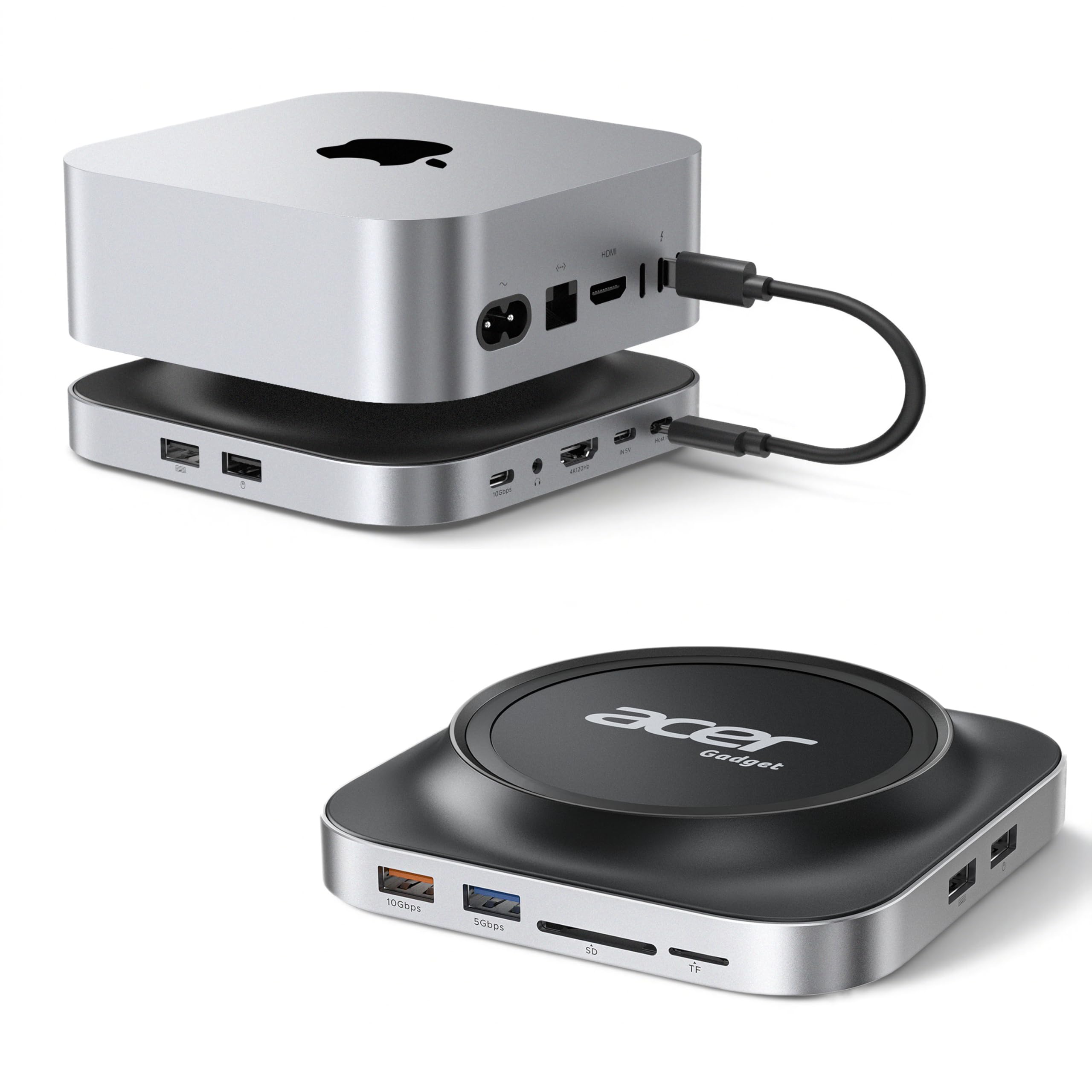
This Acer Mac Mini M4 expansion dock is really practical. It supports SSD expansion storage, including M.2 SSDs of various sizes (2230, 2242, 2260, and 2280), and works with both NVMe PCIe and NGFF SATA. After receiving it, I installed a 2TB NVMe SSD for expansion. The dock has a cover; I secured the SSD with the included screwdriver and screws, attached the included cooling pad, and closed the cover. Connection is simple: plug the included USB-C cable into the Host port on the back of the Mac Mini, and connect the included 5V power adapter. The Mac automatically recognizes the expansion drive; formatting it as exFAT or APFS is all you need. In terms of ports, the front and sides are conveniently arranged: there are 10Gbps USB-C and USB-A ports (the orange one is the fastest), a 5Gbps USB-A port, SD and TF card slots with fast card reading speeds (around 100MB/s), a 3.5mm headphone jack, and an HDMI 2.1 port capable of outputting 4K high refresh rates. I connected a 144Hz monitor, and the picture was very smooth. The entire base sits under the Mac Mini, and the heat dissipation channel is well-designed, so the machine doesn’t get too hot even after long periods of use.
After using it for a few days, I find it very convenient. Previously, the Mac Mini had fewer ports, but now there are many more, allowing me to simultaneously plug in USB drives, read cards, connect external displays, and transfer large files. Adding an SSD has multiplied my storage capacity several times over, so I no longer worry about space when editing videos and storing photos. The aluminum alloy casing feels solid, and the black and gray color matches the Mac Mini well, making my desktop much tidier.
Perfect upgrade for Mac Mini users
My Mac Mini M4’s internal storage was filling up fast with video projects and I didn’t want to pay Apple’s crazy prices for more space, so I got this dock to add an NVMe drive. Setup was straightforward, I popped in a 2TB WD Black drive I had lying around and it worked immediately with full 10Gbps speeds. The port placement makes a huge difference in daily use, having USB-C and the SD card reader on the front saves me from constantly reaching around back which was getting annoying with my previous setup. I shoot a lot of photos for work and being able to plug my camera’s SD card right into the front dock speeds up my workflow considerably. The transfer speeds are solid, moving 30GB of RAW files takes maybe five minutes instead of the twenty it used to take with my old USB 3.0 reader. The dual HDMI support lets me run both my monitors at 4K which is great for multitasking between editing software and reference materials.
I loved the cooling design, the elevated stand creates airflow underneath the Mini and I can reach the power button easily now without having to lift anything. My bluetooth peripherals have been more stable too, no more random disconnects like I was getting with the cheap hub I tried before. The audio jack on the back keeps my speaker cables organized and out of sight. Everything feels well built and the black finish matches my Mini perfectly.